How Affiliate Tracking Cookies Work in ThriveCart (And Why They Matter for Your Sales)

Image of a redheaded lady with one hand holding a laptop and the other with her fist up in the air, indicating success, alongside the blog's title 'How Affiliate Tracking Cookies Work in ThriveCart (And Why They Matter for Your Sales)'

Meet Alex. She’s built a thriving business selling the latest email and social media marketing strategies. When she launched her affiliate program last year, she was excited to have affiliates promoting her products – courses, downloadable templates and guides, and a content creation app.

But there was a problem.

Alex chose an affiliate management platform that didn’t handle cookie tracking properly. When affiliates complained they weren’t getting credited for sales, she’d have to spend hours manually investigating each case. She lost trust with her best promoters, and they stopped sharing her products.

If Alex had been using ThriveCart’s affiliate cookie capabilities – available to ThriveCart Pro+ users – none of that would have happened.

Read on to find out what she could’ve done differently, plus stick around to watch this short video on how affiliate cookies work in ThriveCart. 👇

Key takeaways:

  • ThriveCart uses browser cookies to track affiliate referrals automatically from the moment a link is clicked.
  • You control cookie duration (from seven days to lifetime) and attribution rules (first-click vs. last-click).
  • Affiliates get credited even if customers don’t buy immediately – the cookie travels with them.
  • Understanding how affiliate cookies work helps you maximize commissions and keep your promoters happy.

What happens when someone clicks an affiliate link?
Screenshot of part of the affiliate dashboard in ThriveCart
When a potential customer clicks your affiliate’s unique tracking link, ThriveCart immediately places a cookie in their browser. This happens before they even see your sales page.

That cookie acts like an invisible name tag – it’s stored in their browser and retrieved automatically when they return to checkout

They might:

  • Navigate to your website or sales page
  • Close their browser and come back later
  • Research your product on different sites
  • Finally return to checkout days later


As long as that cookie hasn’t expired, ThriveCart knows exactly which affiliate sent them.

The affiliate link format is critical. It must start with the affiliate ID and look like this:

affiliateID–youraccount.thrivecart.com/product-name

When the customer completes their purchase, ThriveCart:

  1. Checks their browser for a valid affiliate cookie
  2. Confirms the affiliate is approved to promote that product
  3. Automatically assigns them to the order
  4. Queues up their commission


Which means no manual work for you, no messy spreadsheets to maintain, and no disputes over payouts.

👀➡️ YOU MIGHT ALSO LIKE | ‘How to Get Started With Your Own Affiliate Program

You control how long cookies last

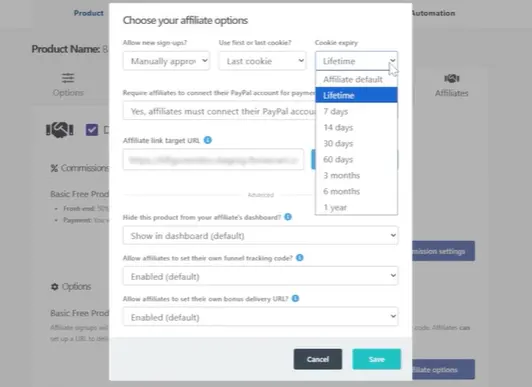
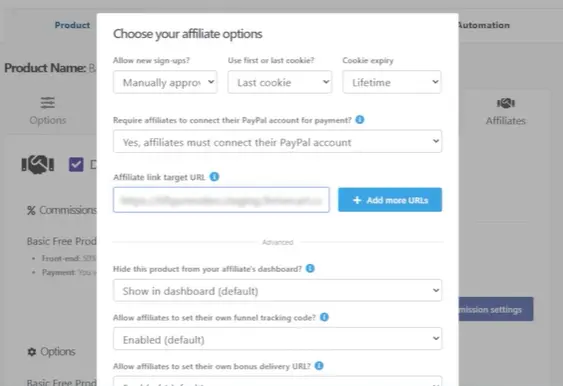
Cookie duration is completely customizable at the product level. Navigate to your product’s Affiliates tab, click “Edit affiliate options,” and choose from:

  • 7 days
  • 14 days
  • 30 days
  • 60 days
  • 3 months
  • 6 months
  • 1 year
  • Lifetime (never expires)


Screenshot showing how to set affiliate cookie duration settings in ThriveCart
Want different durations for different affiliates? Select “Affiliate default” and ThriveCart will use the expiry setting on each affiliate’s individual profile.

One critical detail: cookie duration is set at the moment someone clicks the affiliate link, not when they purchase. If you change settings later, it won’t affect cookies already in browsers – only new clicks will use the updated duration.

Redirects don’t break the tracking

Here’s where ThriveCart really shines. You can redirect customers to your sales page, homepage, or anywhere else after they click the affiliate link. The cookie is already set before the redirect happens.
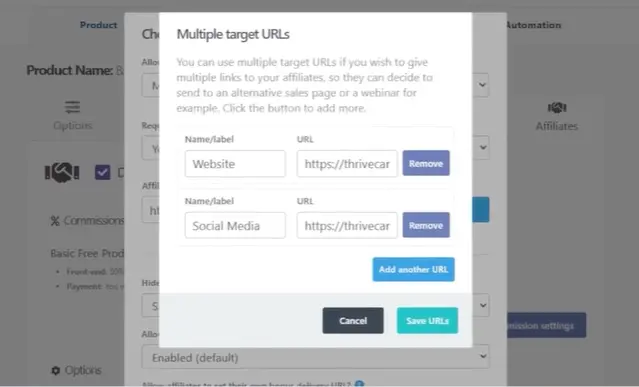
Screenshot showing how to add multiple redirects in the ThriveCart affiliate dashboard

This means your affiliate can promote:

  • Your homepage
  • A specific landing page
  • A blog post
  • A webinar registration page


The customer might spend days on your site reading content and building trust. When they finally decide to buy, your affiliate still gets credited.

You can even add multiple redirect URLs so different affiliates can promote different pages while the tracking stays intact.

👀➡️ RELATED READING | ‘How to Sell Digital Products in 2026: A Step-by-Step Guide

First-click vs. last-click attribution

What happens if a customer clicks through multiple affiliate links before buying? You decide!
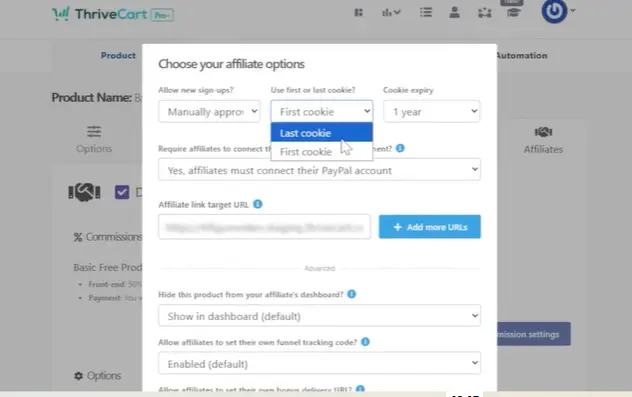
Screenshot showing how to choose first or last cookies for affiliate tracking in the ThriveCart affiliate dashboard

Under “Edit affiliate options,” you’ll find the “Use first or last cookie” setting:

First cookie

Last cookie

The original referring affiliate is locked in and protected from being overridden as long as their cookie remains valid. Perfect if you want to reward the affiliate who first introduced the customer to your product.

The most recent affiliate link clicked gets the commission. Ideal if you want to credit whoever closed the sale.

Most platforms default to one or the other. ThriveCart lets you choose the options that make sense for your business model.

When affiliates don’t get credited (and how to prevent it)

Sometimes sales don’t track back to affiliates. The most common reasons are:

  • Wrong link format: The affiliate shared the URL that appears after the redirect (like youraccount.thrivecart.com/product-name/?affiliate=affiliateID) instead of the original tracking link.
  • Cleared cookies: The customer cleared their browser data before purchasing.
  • Different device: The customer clicked on mobile but bought on desktop.
  • Expired cookie: Too much time passed between the click and the purchase.
  • Unapproved affiliate: The affiliate wasn’t approved to promote that specific product.


Educate your affiliates to always share the full tracking link from their dashboard – the one that starts with their affiliate ID, formatted like: affiliateID–myaccount.thrivecart.com/my-product. That single step prevents most attribution issues.

👀➡️ MORE FROM THE BLOG | ‘How to Track Your Sales Performance Like a Pro With ThriveCart

Why this matters for your business

When affiliate tracking works flawlessly, several things happen:

  • Your affiliates trust the system and promote more confidently.
  • You avoid time-consuming manual commission investigations.
  • Customers get a seamless experience with no broken links.
  • Your sales increase because affiliates aren’t afraid to send traffic.
  • You can set longer cookie windows knowing the tracking is reliable.


ThriveCart handles all of this automatically. Set your cookie preferences once, approve your affiliates, and let the system track everything in the background.

Your affiliates get their dashboard showing real-time clicks and conversions. You get accurate reporting. Everyone gets paid correctly.

That’s how affiliate programs should work – and with ThriveCart’s cookie-based tracking, you set it up easily, freeing your time to focus on what matters most to you and your business.

Button with the words 'Get Started With ThriveCart' on it

Other articles you might find interesting

24 Profitable Digital Products to Sell (And the Best Platform to Sell Them On)

It’s now easier than ever to build a profitable business from your passions, thanks to selling well-crafted digital products.  Unlike physical goods, digital assets like ...
Read Article

How to Successfully Deliver Courses, Memberships, and Downloads With ThriveCart Fulfillment

Marcus had a problem. The Vancouver-based crypto educator had built a thriving community around teaching financial freedom through cryptocurrency and self-employment strategies. His flagship course, ...
Read Article

5 Best Checkout Systems for Creators  Selling Courses, Coaching & Digital Products

The creator economy has transformed how people build online businesses, monetize their skills, and generate sustainable income. A secure, mobile-friendly checkout system makes a huge difference ...
Read Article

Free vs. Paid Trials: How to Choose the Right Strategy for Your Digital Products

Sarah is a Melbourne-based creator who specializes in helping parents navigate the unique challenges of raising neuro-atypical teenagers. She’s developed several comprehensive video courses and ...
Read Article

Ready to grow your business with ThriveCart?

Whether you’re launching your first offer or optimizing your 10th funnel, ThriveCart gives you the tools, control, and leverage to grow a business that’s built to last.