How to Successfully Deliver Courses, Memberships, and Downloads With ThriveCart Fulfillment

A bearded guy smiles out at the reader alongside the blog post's title text 'How to Successfully Deliver Courses, Memberships, and Downloads With ThriveCart Fulfillment'

Marcus had a problem.

The Vancouver-based crypto educator had built a thriving community around teaching financial freedom through cryptocurrency and self-employment strategies. His flagship course, “Crypto Freedom Blueprint,” was selling consistently.

But there was one major bottleneck killing his momentum.

When someone purchased the course, Marcus had to manually email them login credentials. Sometimes at 2AM. Sometimes while he was trying to record content. Or even while he was enjoying dinner with his family.

He was losing precious hours every week to administrative work that should have been automated. Worse, customers were waiting – sometimes for hours – to access content they’d already paid for. His support inbox was filling up with “Where’s my access?” messages.

What Marcus needed was an assistant. Or better yet, access to ThriveCart’s fulfillment options. If he had ThriveCart up and running, within 30 minutes, he could automate the entire delivery process. His customers would get instant access to his courses the moment they complete checkout – without the hassle of any manual work and delays.

Read on to see how ThriveCart makes fulfillment easy, plus here’s a short video detailing the five platform fulfillment options available.

Key takeaways:

  • ThriveCart offers five fulfillment methods to deliver digital products automatically, from simple success URLs to advanced webhook integrations.
  • Your main product’s fulfillment method applies to your entire sales funnel, including order bumps, upsells, and downsells.
  • You can deliver content through direct URLs, course platforms like ThriveCart Learn, autoresponder-based systems, or custom integrations.
  • Proper fulfillment setup eliminates manual work, improves the customer experience, and ensures instant access to digital product purchases.

👀➡️ YOU MIGHT ALSO LIKE | ‘How to Track Your Sales Performance Like a Pro With ThriveCart

Why product fulfillment matters for your business

The moment after someone clicks “Complete Purchase” is critical. Your customer is excited, engaged, and ready to dive into what they just bought. Any friction at this point – waiting for login details, hunting for download links, or confusion about next steps – kills that momentum.

Poor fulfillment creates three major problems:

  • Customer frustration: Delays lead to refund requests and negative reviews.
  • Support overhead: Manual processes generate endless “how do I access this?” tickets/queries.
  • Lost revenue: Complicated delivery systems reduce the perceived value of your offer.


Automated fulfillment solves all three. Your customers get instant access, your support load drops dramatically, and you’re free to focus on creating great content instead of managing administrative tasks.

👀➡️ SEE HOW IT’S DONE | ‘The 4-Day CEO: How Winnie Wu Runs Multiple 7-Figure Businesses With ThriveCart

The 5 fulfillment methods available in ThriveCart

ThriveCart gives you complete control over how customers receive their purchases. Here’s how each method works and when to use it.

Method 1: Manual fulfillment (display invoice)
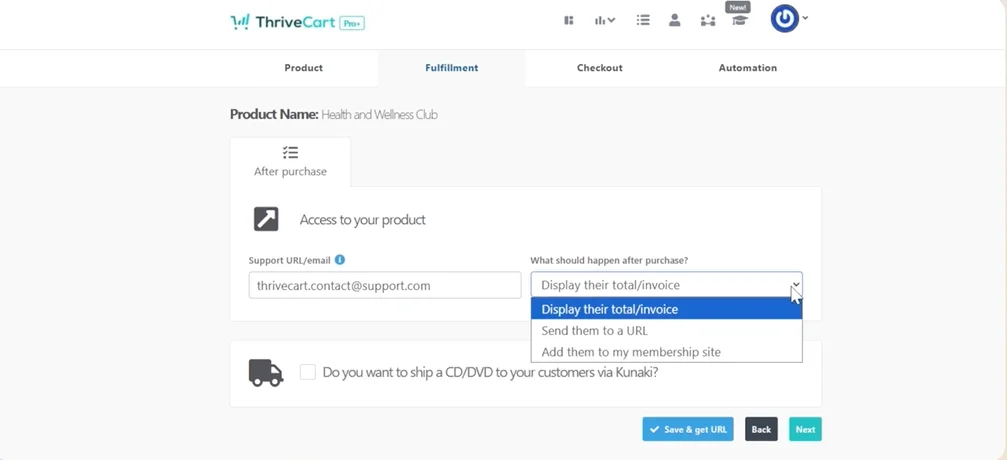
Screenshot showing how manual fulfillment works in the ThriveCart back-endThis is ThriveCart’s default option. When selected, customers see a simple thank-you page with their receipt – but no download links or automatic membership access.

Best for:

  • Service-based businesses that fulfill manually
  • Products requiring approval before delivery
  • Situations where you’re using automation rules or webhooks for delivery


How it works:

After purchase, customers see their order total and invoice. You then handle fulfillment through your own systems, whether that’s manual email, automation rules, or custom integrations.

👀➡️ EXPLORE MORE | ‘Building Loyalty With ThriveCart: 7 Customer Retention Strategies That Work

Method 2: Success URL delivery

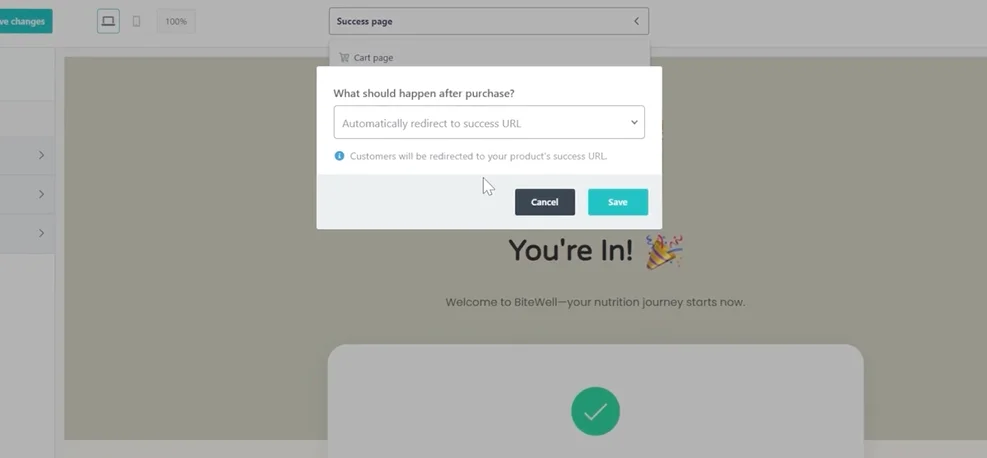
Screenshot showing how to automatically redirect to a success url within the ThriveCart back-endThis method redirects customers to a specific URL after purchase – perfect for direct downloads or custom success pages.

Best for:

  • Digital downloads (PDFs, ZIP files, and software)
  • Custom-built membership areas
  • Products hosted on external platforms


Key features:

  • Set different URLs for different pricing options (for example, standard vs. premium access).
  • Configure link expiration times to protect your content.
  • Assign unique success URLs for bump offers.
  • Enable automatic redirect to skip the ThriveCart thank-you page.


Important note:
 ThriveCart doesn’t host your files. You’ll need to store content on services like Google Drive, Amazon S3, Dropbox, or ProductDyno, then paste those URLs into ThriveCart.

👀➡️ RELATED READING | ‘4 Thank-You Page Examples to Help You Increase Sales & Conversions

Method 3: Membership platform integration
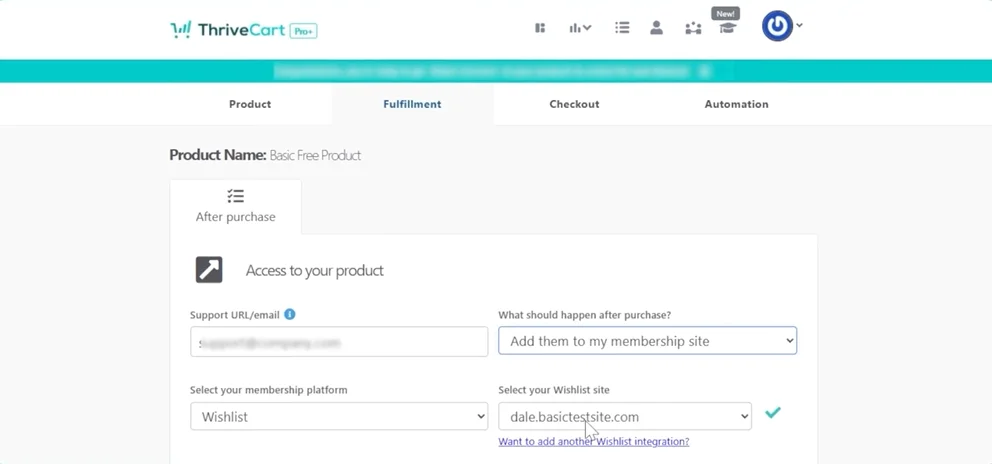
Screenshot showing how to automatically enroll customers into a membership site within the ThriveCart back-endThis is where ThriveCart really shines for course creators. The platform automatically enrolls customers into your membership site or course platform at checkout.

Best for:

  • Online course delivery
  • Membership sites
  • Gated content that requires user accounts


How it works:

When someone purchases, ThriveCart sends their information to your course or membership platform, including ThriveCart Learn (our built-in course platform) and ThriveCart Learn+ (our more advanced LMS). The system automatically:

  • Creates their account (if they don’t have one)
  • Assigns the correct access level or course
  • Triggers welcome emails with login credentials


Advanced options:

  • Map different pricing options to different membership levels.
  • Automatically revoke access on cancellation or refund (platform-dependent).
  • Set custom success URLs customers see after enrollment.

👀➡️ READ A CUSTOMER SUCCESS STORY | ‘From Passion Project to $1 Million in a Year: How Chris Huntley Built a Recurring Revenue Empire With ThriveCart

Method 4: Automation rules

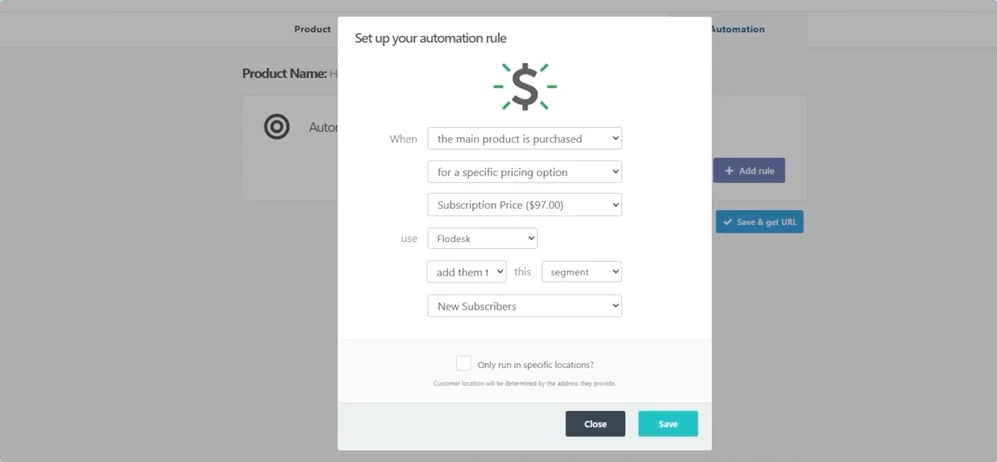
Screenshot showing how to set automation rules for fulfillment within the ThriveCart back-endFor autoresponder-based systems and webinar platforms, automation rules let you trigger specific actions based on purchase events.

Best for:

  • Email marketing sequences
  • Tag-based membership systems (ActiveMember360, Memberium)
  • Webinar platform enrollments (Demio, StealthSeminar)
  • CRM updates


How it works:

Create rules that fire when specific triggers occur. For example, when someone purchases your main product, you can:

  • Add them to an email list
  • Apply access tags
  • Remove tags (for cancellations or refunds)
  • Trigger automation sequences
  • Register them for webinars


This method is essential for platforms like ActiveMember360 and Memberium, which control content access through your autoresponder tags rather than their own user database.

👀➡️ MORE FROM THE BLOG | ‘How Do You Monetize an Email List: 6 Proven Strategies for Turning Subscribers Into Revenue

Method 5: Webhooks (advanced)

Screenshot showing how to set up webhook integrations for product fulfillment within the ThriveCart back-endWebhooks are for developers and advanced users who need custom integrations beyond what native options provide.

Best for:

  • Custom-built platforms
  • Complex multi-system workflows
  • Unique business requirements


How it works:

ThriveCart sends real-time notifications to your server for every event – purchases, refunds, subscription cancellations, and more. Your system then processes these notifications based on your custom logic.

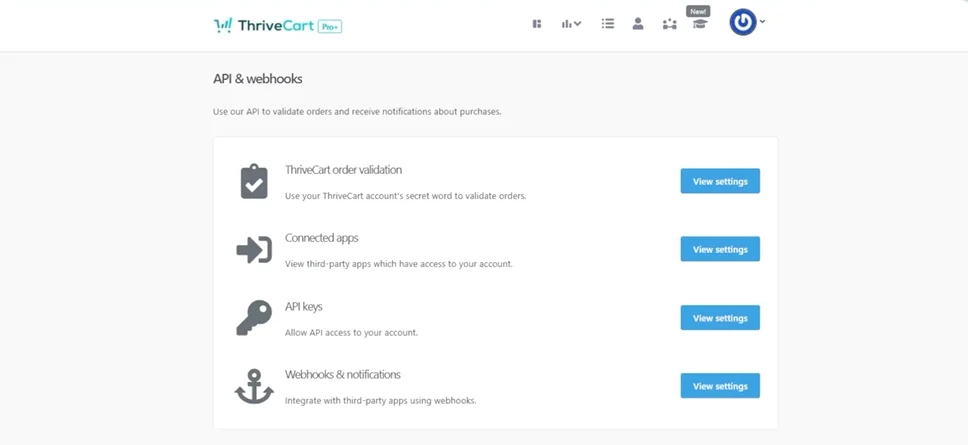
Access webhook settings in Settings > API & Webhooks > Webhooks & Notifications.

👀➡️ FOR YOU | ‘How to Increase Checkout Conversion Rates: 12 Strategies

How fulfillment works across your entire funnel

Here’s something crucial to understand: the fulfillment method you set on your main product applies to your entire sales funnel.

If your main product uses “Send them to a URL,” then your bump offers, upsells, and downsells will all follow this method. The only exception is physical products – you can add physical bumps or upsells and set shipping options separately.

For upsells and downsells specifically:

When using success URL or membership platform fulfillment, you’ll set individual fulfillment for each upsell and downsell directly in the checkout editor. This gives you flexibility to:

  • Send customers to different courses based on which upsell they accept
  • Provide different membership levels for premium upsells
  • Mix and match fulfillment methods throughout your funnel

👀➡️ UPSELL ADVICE | ‘8 Cross-Selling and Upselling Strategies That Maximize Revenue in ThriveCart

Setting up your fulfillment in three steps

Getting started with automated fulfillment is straightforward:

Step 1: Create or edit your product, then navigate to the Fulfillment tab.

Step 2: Choose your fulfillment method from the dropdown menu.

Step 3: Configure your specific settings:

  • Enter URLs for success page delivery.
  • Select and map membership platforms.
  • Set up automation rules for autoresponders.
  • Configure webhooks if needed.


That’s it. Your fulfillment is now sorted.

👀📗➡️ RELATED READING TO DOWNLOAD TODAY | ‘The Skills Crisis Gold Rush: How to Turn Your Expertise Into a 6-Figure Education Empire

Make delivery effortless

The right fulfillment setup transforms your business. Customers get instant access. Your support inbox stays quiet. You eliminate manual busywork and focus on what matters – creating great products and growing your revenue.

So don’t be like Marcus who could’ve gone from spending 10+ hours per week on manual fulfillment to spending zero if he’d just used ThriveCart.

Whether you’re delivering simple PDF downloads, sophisticated course content, or membership access, ThriveCart gives you the tools to automate the entire process.

Ready to automate your product delivery and eliminate manual fulfillment from your business?

Button with the words 'Get Started With ThriveCart' on it

Other articles you might find interesting

5 Best Checkout Systems for Creators  Selling Courses, Coaching & Digital Products

The creator economy has transformed how people build online businesses, monetize their skills, and generate sustainable income. A secure, mobile-friendly checkout system makes a huge difference ...
Read Article

Free vs. Paid Trials: How to Choose the Right Strategy for Your Digital Products

Sarah is a Melbourne-based creator who specializes in helping parents navigate the unique challenges of raising neuro-atypical teenagers. She’s developed several comprehensive video courses and ...
Read Article

5 Common Pitfalls for Health & Wellness Creators and How to Avoid Them

The wellness market isn’t just growing, it’s maturing. With 84% of U.S. consumers naming wellness as a top priority, this shift is creating a new ...
Read Article

Building Loyalty With ThriveCart: 7 Customer Retention Strategies That Work

Every business owner knows that it all starts with a great idea – whether you’re scaling from a four-figure income or thriving in a seven-figure ...
Read Article

Ready to grow your business with ThriveCart?

Whether you’re launching your first offer or optimizing your 10th funnel, ThriveCart gives you the tools, control, and leverage to grow a business that’s built to last.