
The Power of Integrations: How to Supercharge Your Business with ThriveCart

Illustration of several lightning bolts alongside the word 'The Power of ThriveCart Integrations_ How to Supercharge Your Business'

ThriveCart’s over 100 integrations let you connect your checkout and funnel workflows with the tools to help you run your online business, including email marketing, customer relationship management, payment gateways, fulfillment services, and more. With the right tech stack in place, every new ThriveCart purchase can trigger automated workflows that save you time and drive more revenue – whether those features are directly within the platform itself, or are provided by way of a third-party application.

Here’s a breakdown of the most valuable integration categories, showing you exactly how to put them to work:

Key takeaways:

  • ThriveCart integrations let you automate post-purchase workflows in just a few clicks.
  • Connecting ThriveCart to a customer relationship management (CRM) platform keeps your customer data organized and your follow-ups timely.
  • Payment gateway integrations with Stripe and PayPal give your buyers flexibility, reduce cart abandonment, and protect your income.
  • Simple automation via Zapier turns a new ThriveCart purchase into a trigger for dozens of downstream actions across your entire tech stack.


Your tech stack should work for you, not the other way around. ThriveCart’s integrations enable you to automate, scale, and grow without adding complexity.

Button with the words 'Get Started With ThriveCart' on it

1) Email marketing: keep your audience engaged

Email marketing remains one of the highest-returning channels for online businesses, and ThriveCart integrations make it easy to automate your entire follow-up sequence the moment a purchase completes. When you connect ThriveCart to your email platform, every new ThriveCart purchase automatically adds the buyer to the right list, triggers the right sequence, and keeps your customer data up to date without manual data entry.

Here are some of the most popular email platforms that work with ThriveCart:

  • Mailchimp: Automatically add new customers to your mailing lists, segment them based on purchase behavior, and send personalized follow-up emails.
  • ConvertKit: Tailor your email sequences to cater to specific customer journeys, boosting engagement and conversion rates.
  • AWeber: Utilize robust automation to deliver timely content and offers that resonate with your audience.


Other supported intregrations include HubSpot, Drip, ActiveCampaign, Mailerlite, Flodesk, Moosend, Ontraport, and Sendy.

👀➡️ YOU MIGHT ALSO LIKE | ‘How Do You Monetize an Email List: 6 Proven Strategies for Turning Subscribers Into Revenue

2) Membership platforms: build a loyal customer base

Membership sites are an excellent way to generate recurring revenue and build a community around your brand. ThriveCart comes with ThriveCart Learn as standard (or there’s Learn+ for more advanced functionality), so that you can create membership sites of your own. However, if you’ve already built one elsewhere, you can easily integrate with platforms like TeachableKajabi, and MemberPress to help you manage memberships seamlessly.

  • Teachable: Sell online courses and digital products effortlessly, with ThriveCart managing the checkout process and student enrollment.
  • Kajabi: Combine ThriveCart’s checkout power with Kajabi’s suite of marketing tools to enhance your course offerings.
  • MemberPress: Create and manage membership sites, ensuring a smooth experience from sign-up to subscription renewal.

👀➡️ RELATED READING | ‘How to Successfully Deliver Courses, Memberships, and Downloads With ThriveCart Fulfillment

3) Webinar software: engage and educate prospects

Webinars are a powerful tool for demonstrating expertise and engaging with potential customers. When you connect ThriveCart to your webinar platform, you can automate registrations, confirmations, and post-webinar follow-ups without touching a spreadsheet. Zapier acts as the bridge between ThriveCart and dozens of apps, making it easy to create workflows that fire the moment a purchase or registration event occurs.

  • Zapier: Automatically register participants for Zoom or WebinarJam webinars upon purchase and send follow-up emails to enhance engagement.
  • Demio: Deliver high-quality, interactive webinars with easy registration and follow-up processes integrated seamlessly.

👀➡️ KEEP READING | ‘How to Sell Digital Products in 2026: A Step-by-Step Guide

4) Fulfillment services: ship physical products

Did you know you can sell physical products with ThriveCart? Integrations with leading physical products fulfilment services Kunkaki, Lulu, and Vervante let you automatically ship merchandise to your customers with advanced management features.

  • Kunaki: Offer high-quality, cellophane-wrapped CDs, DVDs, Blu-rays and vinyl.
  • Lulu: Print ebooks on demand with this globally popular book printing service.
  • Vervante: Create spiral-bound books, journals, card decks, and much more.


Here’s how to set up your shipping options:
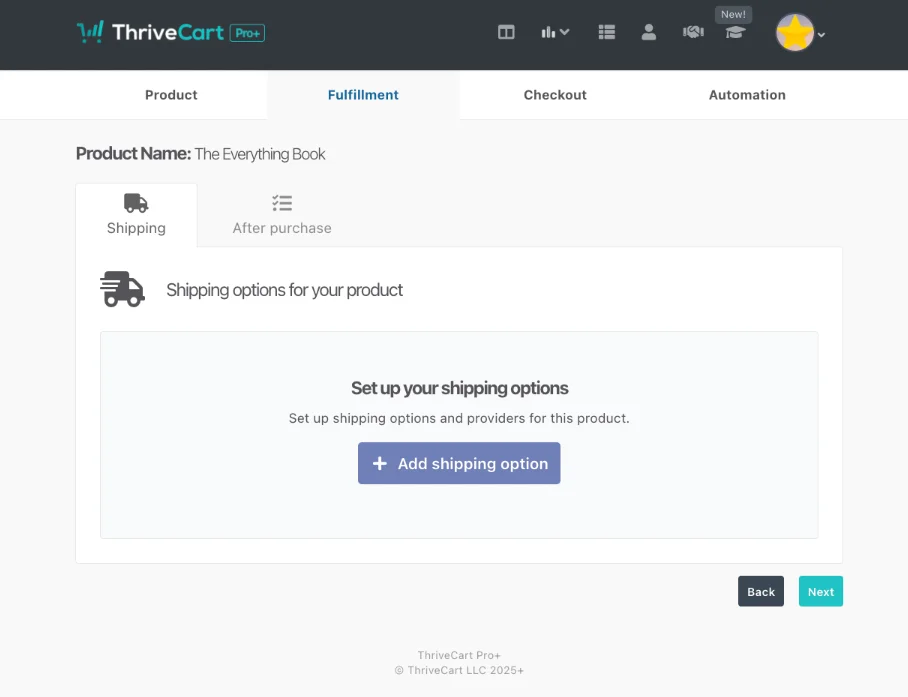
Screenshot showing where to set fulfillment options inside ThriveCart

Button with the words 'Get Started With ThriveCart' on it

👀➡️ HANDPICKED FOR YOU | ‘10 Tips for Maximizing Your Conversions with ThriveCart

5) Payment gateways: offer flexibility and security

Offering multiple payment options is critical to reducing cart abandonment. ThriveCart integrates with major payment gateways, including Stripe, PayPal, and Apple Pay, giving your customers the flexibility to pay however they prefer. Fewer payment barriers mean more completed orders and more consistent income.

  • Stripe: Benefit from a seamless checkout experience and advanced fraud protection features.
  • PayPal: Allow customers to pay with their preferred method, enhancing trust and convenience.
  • Apple Pay: Offer a quick and secure checkout option for Apple users, improving the overall shopping experience.

👀➡️ MORE FROM THE BLOG | ‘5 Best Checkout Systems for Creators Selling Courses, Coaching & Digital Products

6) CRM and automation: manage your customer data at scale

As your online business grows, keeping your customer data organized becomes the difference between a business that scales and one that stalls. ThriveCart integrations with customer relationship management platforms and automation tools let you capture ThriveCart data, including buyer details, product purchases, subscription status, and order information. Then automatically route this data where you need it.

Zapier is the most flexible tool for building these connections. You can create workflows that trigger on virtually any ThriveCart event; whether it’s a new ThriveCart purchase, a subscription that gets paused, a refund that’s been processed, or a payment that’s been declined. Each trigger can fire actions across thousands of apps, letting you build simple automation flows or complex multi-step sequences depending on what your business needs.

Common ThriveCart automation triggers:

  • New ThriveCart purchase: Add the buyer to your CRM, enroll them in a course, send a confirmation SMS, or log the sale to Google Sheets for revenue tracking.
  • Subscription cancelled or paused: Trigger a win-back email sequence, update the contact’s status in your CRM, or remove access to members-only content.
  • Refund approved or payment rejected: Route the order information to your support team, update records, and pause any active workflows tied to that buyer.
  • Upsells completed: Tag the contact in your CRM, add them to a new email sequence, and log the upgraded order for reporting.


If you track revenue in spreadsheets, connecting ThriveCart to Google Sheets via Zapier takes just a few clicks. Every new sale, refund, or subscription change automatically writes a new row, giving you a live record of your sales funnels without manual data exports. Teams managing thousands of buyers find this kind of simple automation essential for keeping customer data accurate across platforms.

Your buyers expect a smooth checkout. Your business deserves automations that run without you. ThriveCart delivers both.

Button with the words 'Get Started With ThriveCart' on it

👀📗➡️ RELATED READING TO DOWNLOAD TODAY | ‘How Independent Creators Are Capturing the $238 Billion Corporate Learning Revolution

FAQs

What integrations does ThriveCart support?
ThriveCart integrates with major email marketing platforms (Mailchimp, ConvertKit, AWeber), payment gateways (Stripe, PayPal, Apple Pay), membership and LMS platforms (Teachable, Kajabi, MemberPress), fulfillment services (Kunaki, Lulu, Vervante), and thousands of apps via Zapier. New ThriveCart integrations are added regularly.

Can I connect ThriveCart to my CRM?
Yes. You can connect ThriveCart to most customer relationship management platforms via Zapier. Every new ThriveCart purchase, subscription event, or refund can trigger automated updates in your CRM, keeping your customer data accurate without manual entry.

Does ThriveCart work with Google Sheets?
Yes. Using Zapier, you can log ThriveCart data (sales, order information, buyer details) directly to Google Sheets in real time. It takes just a few clicks to set up and runs automatically from that point forward.

How do ThriveCart payment gateway integrations work?
ThriveCart connects directly to Stripe and PayPal as primary payment gateways. Buyers choose their preferred payment method at checkout, and ThriveCart handles the transaction processing, fraud detection, and post-purchase workflows automatically.

Do it all with ThriveCart

The old playbook is dead! Discover the new rules of selling digital products. Watch this! 👇

ThriveCart integrations turn a powerful checkout platform into the operational core of your online business. The more ThriveCart data you feed into your broader tech stack, the more your business runs on its own. Start with the integrations most relevant to your current workflow, connect them in just a few clicks, and watch the manual work disappear.

No matter what you need to get done, ThriveCart works seamlessly with all the powerful third-party tools you need to cut down on time, make processes smoother, and do more of what you love.

Start exploring these integrations today and watch your business thrive with ThriveCart!

Button with the words 'Sell Smarter with ThriveCart' on it

Other articles you might find interesting

10 Tips to Increase Conversion Rate With ThriveCart

Your conversion rate is one of the most important sales metrics in your business. It tells you how many site visitors are becoming paying customers.  ...
Read Article

From Simple Setup to Driving Sales: How Smart Creators Use Coupon Codes in ThriveCart

Mo had a problem. As a Notion template creator, he’d built a successful business selling productivity systems to remote workers and entrepreneurs. But managing his ...
Read Article

How Affiliate Tracking Cookies Work in ThriveCart (And Why They Matter for Your Sales)

Meet Alex. She’s built a thriving business selling the latest email and social media marketing strategies. When she launched her affiliate program last year, she was excited ...
Read Article

24 Profitable Digital Products to Sell (And the Best Platform to Sell Them On)

It’s now easier than ever to build a profitable business from your passions, thanks to selling well-crafted digital products.  Unlike physical goods, digital assets like ...
Read Article

Ready to grow your business with ThriveCart?

Whether you’re launching your first offer or optimizing your 10th funnel, ThriveCart gives you the tools, control, and leverage to grow a business that’s built to last.