How Smart Creators Automate Their Email List Growth – Without Lifting a Finger

Meet Sarah. She’s built her coaching business around helping divorced women navigate the dating world with confidence. Her signature course, “Love After Divorce,” has helped hundreds of women rediscover themselves and find meaningful relationships.

But Sarah was getting frustrated. Every time someone bought one of her courses, she’d have to manually add them to her email list. Then she’d realize she forgot to tag VIP customers differently. Or she’d miss sending cart abandonment emails to people who almost bought. Between client calls and creating content, her follow-up system was falling apart.

Then Sarah discovered ThriveCart and its email automation rules…

When you’re running a creator business, your checkout is just the beginning of the customer relationship. The real magic happens in the follow-up – the welcome sequences, the value-packed emails, the exclusive offers that turn one-time buyers into lifelong fans.

That’s where autoresponder automation becomes your secret weapon.

Key takeaways

  • Connect once, automate forever: Set up behavior-based rules that automatically add customers to your email platform the moment they take action on your funnel
  • Segment like a pro: Create different automation paths for purchases, refunds, cart abandoners, subscription renewals, and more – without touching a line of code
  • Save time and increase revenue: Recover abandoned carts, send targeted offers based on what customers bought, and build sophisticated follow-up flows that run on autopilot


Keep reading to see how it works, plus watch this short video where we show you exactly how to add customers to your email autoresponder, from inside your ThriveCart dashboard.

Why connecting your email platform to your checkout changes everything

Every creator knows that the money is in the list. But building that list manually? That’s a recipe for:

  • Missed opportunities when you forget to add a buyer
  • Agonizing over your inability to segment customers based on their behavior
  • Lost sales from abandoned carts you never followed up on
  • Generic emails instead of personalized journeys
  • Hours wasted on manual data entry


When you automate the connection between your checkout and your email marketing tool, you unlock behavior-based marketing automation that actually works.

👀➡️ YOU MIGHT ALSO LIKE | ‘How Do You Monetize an Email List: 6 Proven Strategies for Turning Subscribers Into Revenue

How automation rules work in ThriveCart

ThriveCart makes connecting your email platform to checkout ridiculously simple. Here’s the process:

Step 1: Navigate to your product’s automation tab

Inside your product settings, click on the Automation tab. This is mission control for all your behavior-based rules.
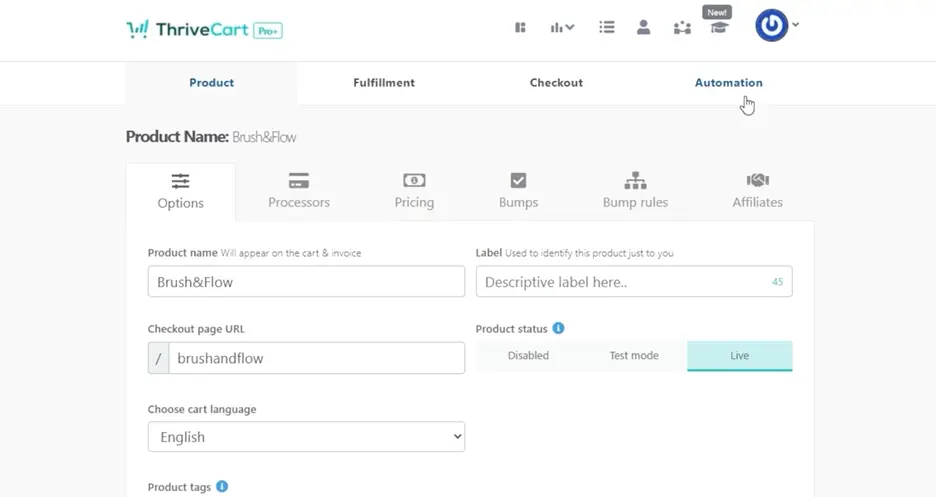
Screenshot showing where to head to a product's automation tab in ThriveCart to start setting up email automations

Step 2: Choose when your rule triggers

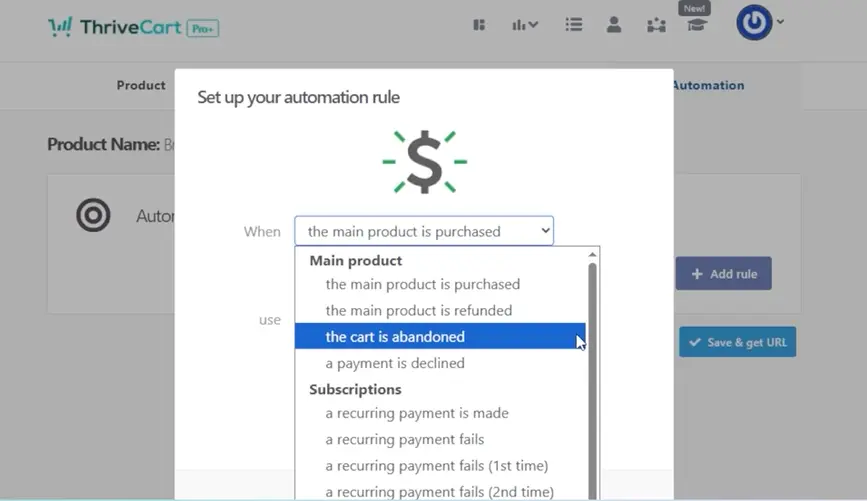
Click Add rule and select when you want the automation to fire. Your options dynamically update based on how your product is set up:
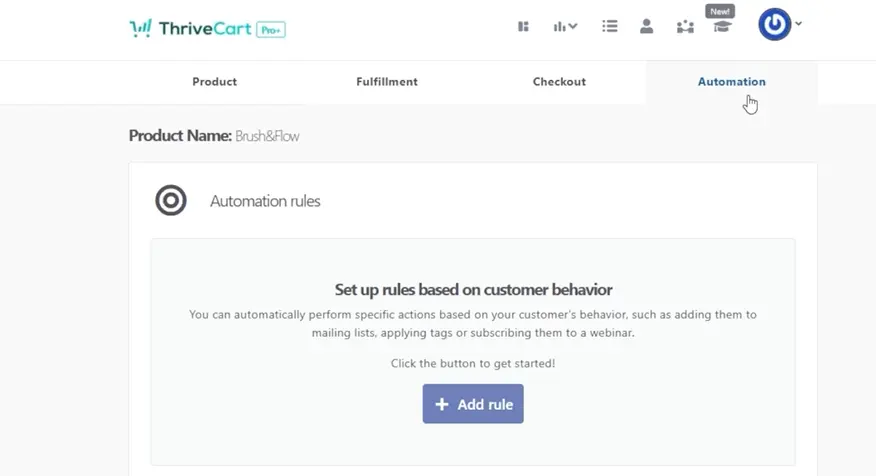
Screenshot showing where to set up automation rules in ThriveCart
For all products:

  • The main product is purchased
  • The main product is refunded
  • Customer abandons the cart
  • Payment is declined

Screenshot showing where to set up main product automation rules in ThriveCart
If you have bump offers enabled:

  • The bump offer is purchased
  • The bump offer is refunded


If you have subscription pricing:

  • Customer makes recurring payments
  • Subscription payment fails
  • Subscription cancelled
  • Subscription paused
  • Subscription resumed


For specific pricing options:

Want laser-focused targeting? You can trigger rules for specific payment plans – like sending monthly subscribers to a different sequence than annual customers.

Step 3: Select your service and action

Choose which email marketing tool you want to use from the dropdown. ThriveCart integrates directly with several leading autoresponders, including:

  • ActiveCampaign
  • AWeber
  • Kit (previously known as ConvertKit)
  • Drip
  • GetResponse
  • HubSpot
  • Klaviyo
  • Mailchimp
  • MailerLite
  • Ontraport


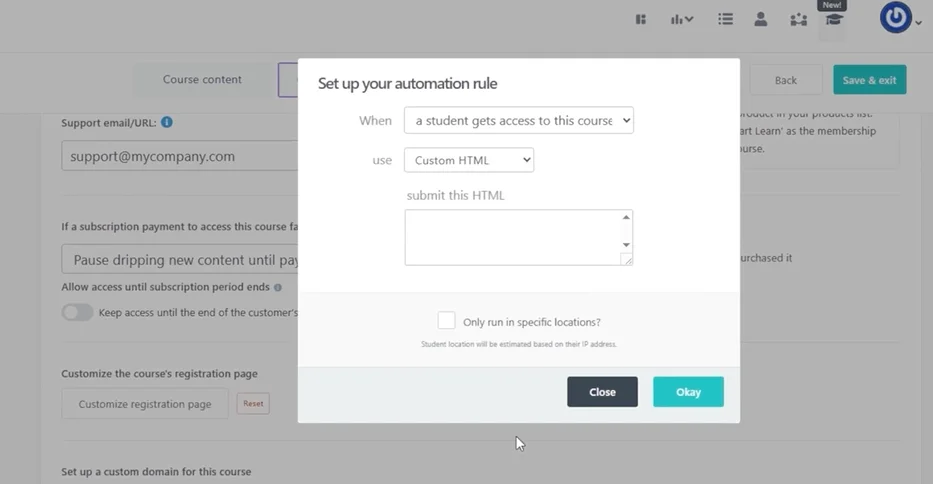
Plus, if your platform isn’t listed, you can use the Custom HTML option to connect virtually any service.
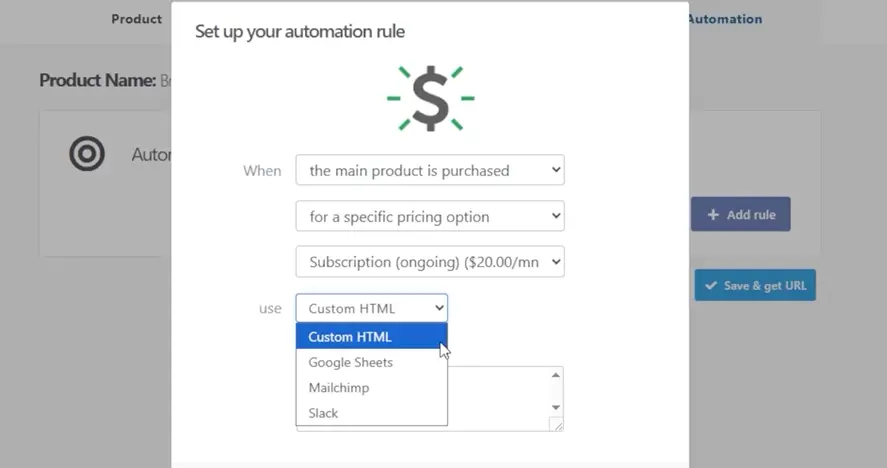
Screenshot showing where to select custom HTML when setting up email automations in ThriveCart

Step 4: Choose what happens next

Depending on what your autoresponder supports, you can:

  • Add or remove tags
  • Subscribe customers to a list
  • Trigger an automation sequence
  • Remove customers from lists
  • Add them to Google Sheets


The available actions automatically populate based on your connected service’s capabilities.

👀➡️ RELATED READING | ‘How to Track Your Sales Performance Like a Pro With ThriveCart

Real-world automation examples

For new course buyers:
Customer purchases your main product → Add to “Course Buyers” list → Trigger welcome sequence

For cart abandoners:
Customer abandons cart → Add to abandoned cart list → Send recovery sequence with limited-time discount

For subscription customers:

  • Subscription payment succeeds → Add tag “Active Member”
  • Subscription payment fails → Add tag “Dunning” → Trigger payment recovery sequence
  • Subscription resumes → Remove “Dunning” tag → Add back to main member list


For bump offer buyers:
Customer purchases bump → Add tag “VIP Buyer” → Trigger bonus content sequence

Automation rules aren’t just for products

Sarah quickly discovered that automation rules aren’t limited to main products. You can set them across your entire ThriveCart account:

  • Upsell/downsell rules: Set directly within each upsell product
    Screenshot showing where to set upsell automation rules in ThriveCart
  • Affiliate rules: Automatically add new affiliates to your partner communication list
  • Screenshot showing where to set affiliate automation rules in ThriveCartLearn course rules: Trigger emails when students complete specific lessons
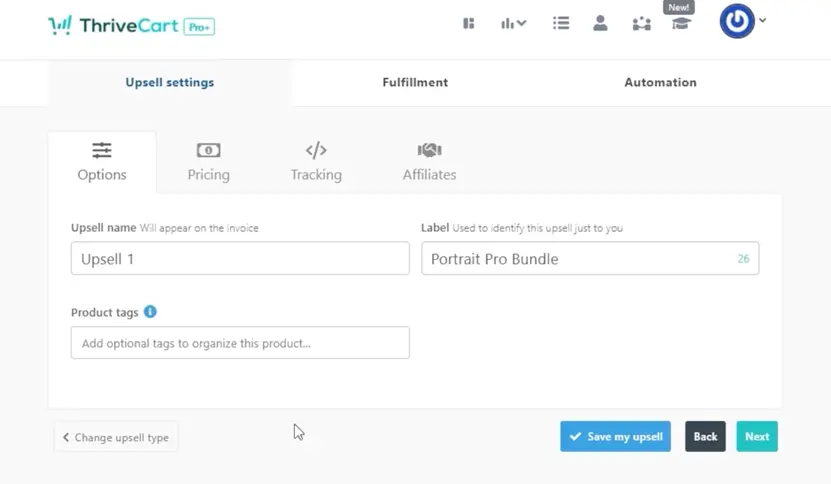
Screenshot showing where to set course automation rules in ThriveCart
This gives you complete flexibility to build sophisticated customer journeys without hiring a developer.

👀➡️ EXPLORE MORE | ‘10 Tips to Increase Conversion Rate With ThriveCart

The bottom line

Every minute you spend manually managing your email list is a minute you’re not spending creating content, coaching clients, or growing your business.

With ThriveCart’s autoresponder automation, you set up your rules once and they work forever. Your customers get added to the right lists instantly. Cart abandoners get followed up with automatically. Subscription customers receive the perfect email at the perfect time.

And you? You get your time back.

Just like Sarah, who now spends her mornings coaching instead of copying and pasting email addresses into spreadsheets.

Ready to automate your customer journey and never miss a follow-up again? Get started with ThriveCart and turn your checkout into a growth engine that runs on autopilot.

Button with the words 'Get Started With ThriveCart' on it

Other articles you might find interesting

From Influence to Independence: The New Blueprint for Lifestyle Creators

Jules Dudko spent years building a 250,000-follower fashion audience on Instagram. “I used to be a capital-I ‘influencer,’ running a lifestyle and fashion blog in ...
Read Article

Richer API Data, U.S. Self-Cancellation Rights & Webhook Security

The mid-April feature release delivers meaningful improvements across three areas that matter most to power users and developers building on ThriveCart. For merchants and developers leveraging ...
Read Article

10 Tips to Increase Conversion Rate With ThriveCart

Your conversion rate is one of the most important sales metrics in your business. It tells you how many site visitors are becoming paying customers.  ...
Read Article

The Power of Integrations: How to Supercharge Your Business with ThriveCart

ThriveCart’s over 100 integrations let you connect your checkout and funnel workflows with the tools to help you run your online business, including email marketing, customer ...
Read Article

Ready to grow your business with ThriveCart?

Whether you’re launching your first offer or optimizing your 10th funnel, ThriveCart gives you the tools, control, and leverage to grow a business that’s built to last.