
A silver padlock on a gradient background alongside the blog post's title text, '117 Million Malicious Requests Blocked: ThriveCart’s Latest Security Wins'

With cyber-attacks making headlines around the world, it’s natural to ask what your commerce platform is doing to keep your business safe.

Since August, ThriveCart has continued strengthening the systems that protect your checkouts, customer data, and day-to-day business. That work includes blocking automated attacks at scale, responding quickly to PHP security issues, improving monitoring, and keeping the platform available 24/7 for the businesses that rely on it.

In the last 30 days alone, we’ve blocked more than 117 million malicious or unwanted requests. On October 21, we blocked as many as 22.9 million requests in a single day. More than 24 million exploit and scanner attempts were also blocked during the same period.
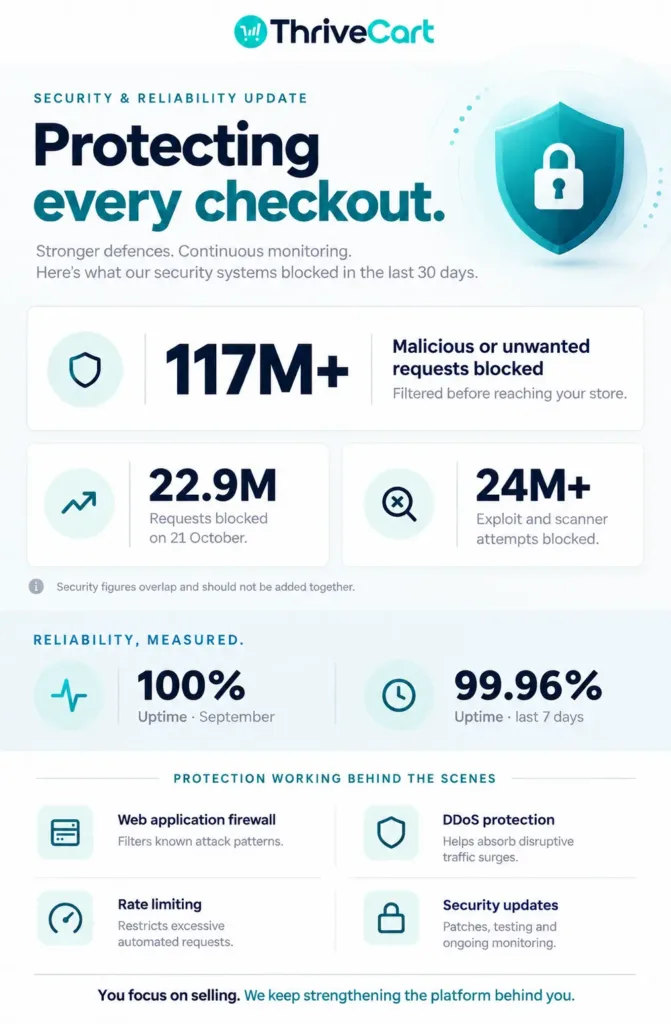
These numbers show something important: security isn’t a box we check once. It’s an active, ongoing part of how ThriveCart operates.

Key insights

  • ThriveCart blocked more than 117 million malicious or unwanted requests in 30 days.
  • More than 24 million exploit and scanner attempts were blocked before they could cause harm.
  • We identified and quickly fixed PHP security issues in our environment.
  • Recent uptime has remained strong, with 100% recorded in September 2026 and 99.9% in October 2026 (according to UptimeRobot).

How does ThriveCart protect payment information?

ThriveCart is PCI DSS v4.0.1 Level 1 certified, the highest level of payment security certification available for service providers. The assessment was completed by A-LIGN, an independent Qualified Security Assessor, with a fully compliant result and no exceptions.

The most important point for customers is that ThriveCart doesn’t receive, process, or store credit/debit card numbers.

When a customer enters payment information, the card details are handled directly by the payment processor through a hosted payment form. ThriveCart receives only non-sensitive transaction information and processor-generated tokens.

That design reduces the amount of sensitive payment data inside the ThriveCart environment and helps protect both merchants and their customers.

How reliable has ThriveCart been recently?

Security and uptime go hand in hand. A platform needs to be protected, but it also needs to be available when customers are ready to buy.

Our uptime monitor currently shows:

Monitoring period

Uptime

Last 7 days

99.96%

October 2026

99.9%

September 2026

100%

We’ve also continued improving monitoring, alerting, incident response, and status communications so we can identify issues faster and keep customers better informed.

No online platform can promise that unwanted traffic will disappear. What we can do is keep improving the systems that detect it, block it, and help us respond quickly.

What has ThriveCart blocked in the last 30 days?

The internet is full of automated traffic and today, more than ever, AI-driven automation which is no always controlled or well intended. Some of it is useful, but a lot of it is made up of bots scanning websites for weaknesses, trying common login paths, or looking for software that isn’t even running on the site.

Over the last 30 days, ThriveCart has blocked:

  • More than 117 million malicious or unwanted requests
  • Up to 22.9 million blocked requests in one day, recorded on October 21
  • More than 24 million exploit and scanner attempts


These figures represent different views of the traffic we’ve stopped, so they shouldn’t simply be added together. Together, they show the scale of unwanted activity hitting online platforms, not just ours, every day.

Cyber-attacks are becoming increasingly common in the age of AI

  • 27 sec: Fastest eCrime breakout time on record
  • 89% increase in attacks by AI-enabled adversaries
  • 266% increase in cloud-conscious intrusions by state-nexus threat actors


Source: Crowdstrike

What do these exploit and scanner attempts look like?

Many attacks are automated. They don’t begin with someone personally targeting a specific business. Instead, a program scans thousands of websites looking for familiar weaknesses.

These scans may search for:

  • WordPress login pages
  • VPN login screens
  • Windows management tools
  • Exposed configuration files
  • Public code repositories
  • Known paths linked to older software vulnerabilities


Internal traffic reviews found repeated attempts to access paths connected to software that ThriveCart doesn’t use, including WordPress, Ivanti, Pulse Secure, and Windows Remote Management tools. None of those paths represented valid ThriveCart customer activity.

That’s why blocking this traffic early matters. It keeps automated probes from reaching the parts of the platform that handle real customer activity.

Did you know?

According to the Microsoft Digital Defense Report, 73.3% of global cyber-attack attempts involve social engineering, phishing, valid account abuse, or user interaction, with Microsoft detecting over 46 million identity impersonation attacks.


Set up your 2-factor authentication (2FA) today.

Why does blocking unwanted traffic matter?

A blocked request does not get to continue through the platform.

Instead of allowing every request to reach the application, our security systems review traffic first. Requests that match known attack patterns, suspicious behavior, or irrelevant scanner paths can be stopped before they put unnecessary pressure on the application, database, or PHP processes.

This helps us:

  • Reduce noise from automated scanners
  • Protect application resources
  • Keep genuine customer traffic moving
  • Spot new patterns more quickly
  • Respond to large traffic spikes before they become a bigger problem


The goal isn’t to block legitimate customers. It’s to separate normal activity from traffic that clearly doesn’t belong.

How did ThriveCart block the malicious traffic?

The short answer is that we use several layers of protection rather than relying on just one tool.

Our AWS Shield Advanced and Web Application Firewall (WAF) work together to protect the production application. Shield Advanced provides protection against Distributed Denial of Service (DDoS) attacks, while AWS WAF inspects incoming HTTP/HTTPS traffic and applies security rules to identify and block malicious requests. Together, they provide multiple layers of protection, helping ensure that only legitimate traffic reaches the production application.

How does the web application firewall help?

The WAF can identify and block traffic based on rules, patterns, request rates, and known attack behavior.

That includes:

  • Managed rules designed to detect common web attacks
  • Custom rules for scanner paths that don’t belong to ThriveCart
  • Rate-based rules that limit unusually high request volumes
  • Protections for suspicious traffic patterns
  • Monitoring that helps the team understand what’s being blocked and why


During earlier traffic analysis, we identified large volumes of automated requests aimed at paths that didn’t exist on ThriveCart. That work helped us focus on blocking irrelevant scanner traffic before it reached PHP.

How do rate limits help?

Rate limits help prevent one source, or a group of sources, from sending an unusually high number of requests in a short period of time.

This is useful for stopping:

  • Automated login attempts
  • Request floods
  • Repeated scans
  • High-volume bot activity
  • Traffic spikes that could slow down normal customers


Some attacks are spread across thousands of addresses, so no single protection is enough on its own. That’s why rate limits work alongside firewall rules, monitoring, and broader DDoS protections.

How does DDoS protection fit in?

Distributed denial-of-service attacks, or DDoS attacks, try to overwhelm a website with a large volume of traffic.

ThriveCart uses additional network-level protection to help identify and reduce this type of activity. During a previous attack, AWS Shield mitigation blocked hundreds of thousands of requests during the peak hour.

The wider lesson is simple: when attack traffic increases, protection needs to respond at the network, firewall, and application levels. 

That’s exactly what we did and continue to do to ensure maximum platform security.

How did we respond to PHP & node.js security issues?

PHP and NodeJS are some of the technologies used to power parts of the ThriveCart platform. Like any widely used technology, it can be affected by newly discovered flaws.

When any language or framework security issues were identified in our environment, we fixed them within hours. This included:

  1. Identify the issue
  2. Apply the required fix
  3. Test the change
  4. Deploy it safely
  5. Continue monitoring for unusual activity


We don’t wait for a security issue to become a customer-facing problem before taking it seriously. Fast fixes are important, but so are testing, monitoring, and making sure the change works as expected.

This sits alongside the broader security controls we already maintain, including vulnerability scanning, penetration testing, secure connections, access controls, monitoring, and formal incident response processes.

What does this mean for your business?

For ThriveCart customers, these improvements are designed to stay in the background so you can focus on running your business.

You can keep using ThriveCart to:

  • Sell products and services through secure checkout pages
  • Accept payments without storing customer card details in ThriveCart
  • Run offers, subscriptions, and funnels on a platform protected by multiple security layers
  • Rely on active monitoring and ongoing improvements
  • Give your customers a smoother, more trustworthy buying experience


You shouldn’t need to become a cybersecurity expert to sell online. Our job is to handle the complicated work behind the scenes and keep making the platform safer, stronger, and more dependable.

What should you take away?

Threats change constantly, but our approach stays focused:

  • Block unwanted traffic as early as possible
  • Fix security issues quickly
  • Protect payment information by design
  • Monitor uptime and system activity continuously
  • Keep improving the platform based on what we learn


The strongest security work often happens quietly. You may never see the millions of requests being stopped in the background, but they’re part of the reason your checkout can keep doing its job.

At ThriveCart, security isn’t a one-time project. It’s part of how we build, monitor, and improve the platform every day.

Other articles you might find interesting

What ThriveCart Merchants Should Know About the EU Consumer Credit Directive

Learn how CCD2 may affect Split Pay, subscriptions, installment plans, and third-party financing for EU consumers, plus steps merchants can take today.
Read Article

October 12-25, 2026 Platform Updates: More Anchored Billing Dates, Multi-Currency Reporting Updates & a Smoother Community Experience

See ThriveCart and Academy improvements from October 12-25, 2026, including anchored billing, ThrivePages, and smoother community management.
Read Article

ThriveCart vs Systeme.io: All-In-One Simplicity or Deeper Revenue Optimization?

Find out whether ThriveCart or Systeme.io is right for you. Compare features and pricing as of 2026 to see which is the better fit for ...
Read Article

ThriveCart vs Teachery: Which is the Better Platform for Selling Courses & Digital Products?

Comparing ThriveCart with Teachery? See how pricing, checkout tools, courses, communities, video hosting, affiliates, security, and compliance stack up in 2026.
Read Article

Ready to grow your business with ThriveCart?

Whether you’re launching your first offer or optimizing your 10th funnel, ThriveCart gives you the tools, control, and leverage to grow a business that’s built to last.