October 5-11, 2026 Platform Updates: Smoother Payments, Enhanced Reporting, Better Course Tools, and More Reliable Experiences
Last Updated: October 16, 2026

Every week, we roll out improvements across ThriveCart and ThriveCart Academy to make selling, managing customers, tracking performance, and delivering courses easier. Here’s what changed between October 5 and 11, 2026.
ThriveCart
Account and connected-tool access checks are stronger
Additional protections now help ensure that account actions and connected-tool requests are checked before they are processed. Sign-in and data access flows also have stronger safeguards against unusual or excessive activity, helping keep merchant accounts and connected services more secure.
Checkout fulfillment is more resilient when payment-plan information is incomplete
Improvements to payment fulfillment handling help orders continue through the correct process when product payment-plan details are temporarily unavailable. This reduces the chance of an order becoming stuck during busy periods or unusual checkout conditions.
Fulfillment retries are more reliable after temporary processing conflicts
If a temporary processing conflict occurs while an order is being completed, ThriveCart can now retry the fulfillment more safely instead of prematurely closing the process. This gives eligible orders another opportunity to complete successfully.
Captured payments can still be recorded when product settings change afterward
ThriveCart now handles situations where a customer has already paid but a merchant changes the product configuration before the order is fully recorded. The platform can use the payment that was actually captured to complete the order, helping keep payment and order records aligned.
Paid charges are protected when duplicate payment records are present
ThriveCart now handles duplicate or outdated payment records more carefully during order processing. This helps ensure that a valid captured payment is not accidentally removed from the order being completed.
Fulfillments are less likely to be missed during order processing
Improvements to fulfillment tracking help ensure that orders are picked up correctly by the order processor. This supports more dependable processing for customers who have completed payment and are waiting for their order or access to be finalized.
Merchant customer counts are more accurate in analytics
Analytics now does a better job of counting the customers who have purchased from a merchant. This helps merchants get a more complete and accurate view of how many customers they have served, including customers whose purchase records do not include a standard order total.
Source performance charts load more reliably
The Products and Sales Source view has been improved so performance charts are less likely to remain in a loading state. Merchants can get to their traffic and sales-source data more consistently when reviewing performance.
Large CSV report jobs can be queued more reliably
Improvements to large-report processing help CSV export jobs move beyond the initial loading stage more reliably. This makes it easier for merchants with larger datasets to request and retrieve the reports they need.
Zapier receives more accurate order amounts when bumps and taxes are included
Order information sent to Zapier now better reflects the amounts paid for the main product, bumps, and taxes. This helps merchants rely on more accurate purchase data in connected workflows and downstream automations.
ThrivePay Installments can be enabled across eligible products more easily
Previously approved ThrivePay Installments merchants can now receive a prompt from the Products page to enable Installments across eligible one-time products. This reduces the need to update products individually and makes it easier for merchants to offer flexible payment options across their catalog.
ThriveCart Academy
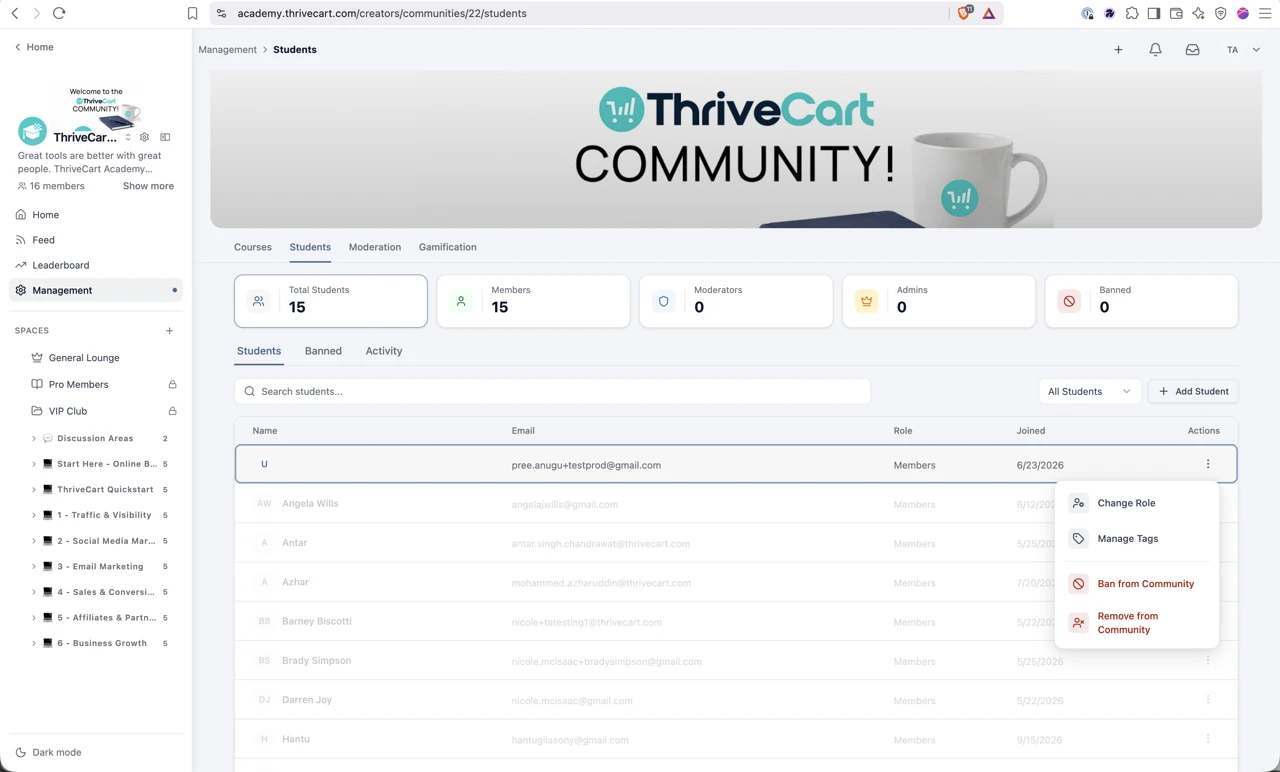
Creators can suspend students directly from the student profile
Creators can now suspend a student directly from the student profile page. This gives them a quicker way to manage access when a student’s participation needs to be paused.
Tags refresh more consistently after changes
Academy now refreshes tag information more reliably after updates. This helps creators see current tagging information without needing to repeat actions or work from an outdated view.
Duplicated modules retain their intended structure
Copying modules now provides a more dependable starting point for course creation. Creators can reuse existing structures while reducing the need to manually correct duplicated content.
Course and community labels are clearer across supported languages and dark mode
Updated labels and messages make it easier for creators and students to understand actions across course, community, messaging, date, and dark-mode experiences. These refinements create a more consistent interface as users move through Academy.
Course cards provide clearer lesson information
Course cards now show more accurate lesson totals, giving students and creators a clearer understanding of how much content a course contains.
Sign-in preview better reflects the available viewing area
Sign-in preview behavior has been improved so creators can review the experience more accurately within the available screen area. This makes it easier to understand how a sign-in page will appear before sharing it with students.
Ownership and enrollment information is easier to understand
Academy now presents owner, member, visibility, and enrollment information more clearly. This helps creators understand who manages a course or community and how access is being provided.
Profile photo updates save more reliably
Creators and students can update profile photos with greater confidence. Improvements to the save process help ensure the new image is retained as expected.
Course structure is cleaner when duplicating or linking content
Improvements to anchors and module-based access grants help keep duplicated course content and drip settings organized. This makes it easier for creators to reuse course structures while preserving the intended student experience.
Adding community members is more reliable
Creators can add community members more consistently without being stopped by an unexpected interruption. This makes it easier to bring new members into the right community experience.
The Unenroll action is labeled more clearly
Updated wording makes the unenrollment action easier to recognize. This gives creators clearer guidance when changing a student’s course access.
Customer visibility and manual course access are easier to manage
Improvements to customer visibility and manual course enrollment help creators understand who can access a course and grant access when needed. This supports faster assistance when a student needs help getting started.
Bulk-upload workflows provide clearer confirmation
Academy now gives clearer confirmation during bulk uploads. Creators can better understand when the upload has been received and can move forward with greater confidence.
Student navigation is clearer in preview
The preview experience has been adjusted so the sidebar no longer covers important student navigation. This makes it easier for creators to review how students will move through a course.
Reserved course and community URLs are handled more clearly
Academy now provides clearer handling when a creator chooses a URL that’s already reserved. This helps creators select an available address without confusion.
The add-student window works better at different screen sizes
The add-student experience has been improved so controls remain accessible when the window has limited space. This makes it easier to add students without needing to adjust the page repeatedly.
Dark-mode contrast is clearer for students
Additional dark-mode improvements make text and interface elements easier to distinguish. This supports a more comfortable learning experience for students who use dark mode.
Students have more focused control over lesson resources
Resource-status controls now behave more predictably for students. This helps ensure that students can take the actions intended for them without changing broader course settings.
Unavailable live events now provide clearer feedback
When live events aren’t available, students now receive a clearer response instead of encountering an unclear loading or service message. This makes the experience easier to understand and reduces confusion.
The lesson editor is more resilient while creators work
Improvements across lesson loading, media playback, editing, and drag-and-drop interactions help creators build and organize courses more smoothly. These changes make the editor more dependable across different lesson structures and workflows.
Custom-domain support guidance is easier to find
Updated support guidance makes it easier for creators to understand and configure custom Academy domains. This helps creators deliver a more consistent branded experience for students.
|
That’s what’s new. What’s next?
ThriveCart is trusted by more than 75,000 creators and businesses worldwide, who have processed over $8 billion through the platform. ThriveCart Academy and the legacy Learn LMS have supported more than 13 million student enrollments and bring the same product expertise behind our high-converting checkout to courses and communities. Creators can use both platforms to sell, deliver, and manage their customer experience.
ThriveCart regularly adds new features and updates, so join our Facebook Community for the latest developments.
Not yet a ThriveCart customer? Get a demo or view our pricing and plans.