

We continually roll out more improvements to ThriveCart and ThriveCart Academy, with updates designed to make selling, managing customers, tracking performance, and delivering courses easier. This edition covers two weeks of updates, bringing together improvements and new features released between September 21 and October 4, 2026.
ThriveCart Academy
Upsell and downsell purchases can now unlock Academy content
ThriveCart Academy now supports fulfillment for mapped upsells and downsells, helping creators turn more of their checkout journeys into complete learning experiences.
Creators can map an Academy course, community, or space to an upsell or downsell through the existing ThriveCart Fulfillment settings. When a buyer accepts the offer, Academy grants access to the mapped content and sends the usual access-ready notification.
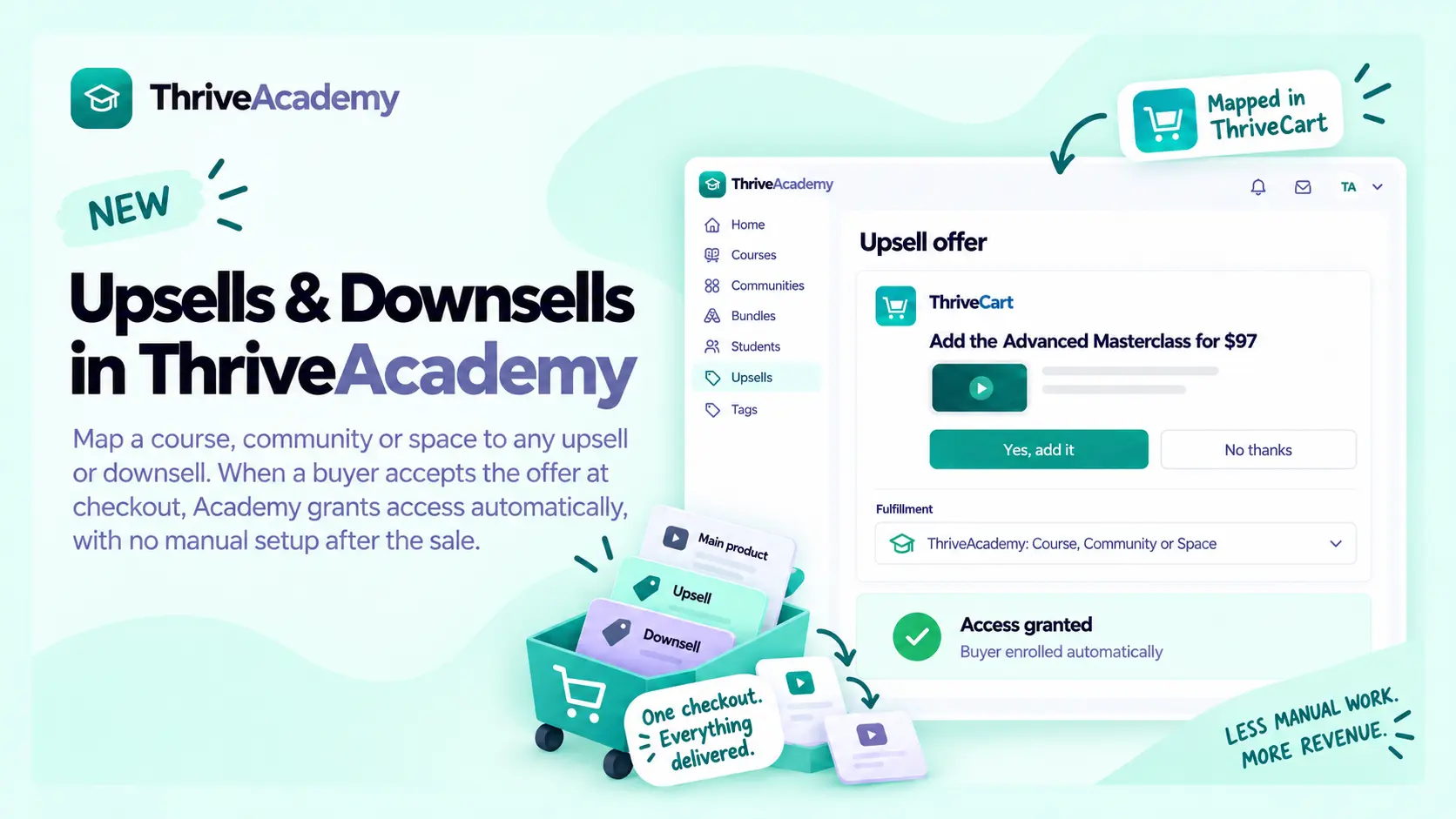
This means a customer who accepts an additional offer during checkout can receive the corresponding Academy experience automatically, without the creator needing to provision access manually after the purchase.
The update also keeps access changes tied to the relevant funnel item. If an upsell or downsell purchase is refunded or canceled, Academy removes only the access granted by that offer. Access from the main product or another purchase remains available, so customers don’t lose content they still own.
The experience also avoids duplicate enrollment. If a buyer already has access to the mapped course, community, or space through another active purchase, accepting the offer will not create a duplicate enrollment.
Creators who migrated funnel mappings from ThriveCart Learn (ThriveCart’s legacy LMS) also benefit from improved compatibility, helping older mapping formats resolve correctly when they are used for Academy fulfillment.
Student homepage now brings progress, engagement, community activity, and ratings together
A big upgrade to the Student homepage gives learners more useful information and more ways to stay engaged with their Academy experience.
Students with access to courses can see a new progress stats row with four quick-view cards covering courses enrolled, courses completed, certificates earned, and lessons completed during the current week. Each card can be opened to take the student to the relevant area of their Academy.
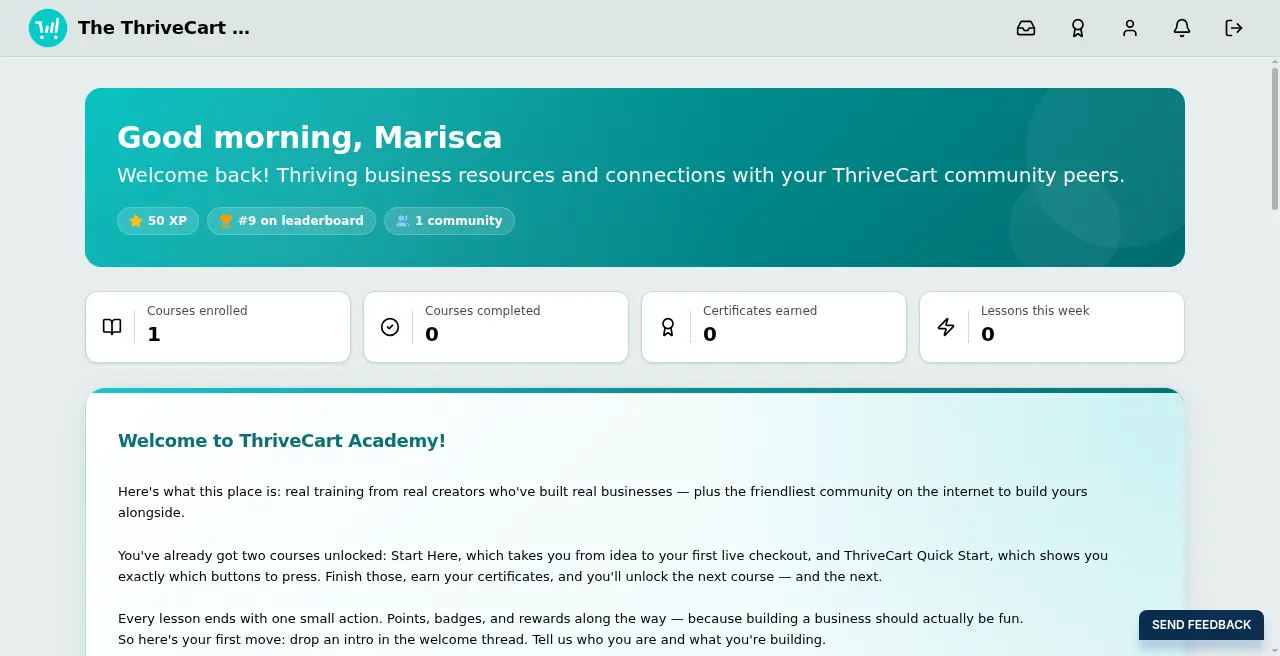
Growth and Scale plan students with access to a standard community may now see chips showing their streak, XP, leaderboard position, and the number of communities they have joined. Chips only appear when there’s information to show, so students won’t see empty or zero-value chips.
Students who belong to a standard community can also see a read-only Activity Feed titled “What’s happening.” It brings together recent activity from their selected community and provides links into relevant posts, lessons, or events, making it easier to see what’s new without searching through the community manually.
Course and community cards can now display star averages and rating counts when rating data is available. Students may be invited to leave a rating after meaningful engagement, such as completing at least half of a course or participating in a community discussion. Where no ratings exist yet, the cards remain clean rather than displaying empty or zero-star scores.
Creators can now review detailed quiz results
Course Analytics now shows which students passed or failed a quiz. Creators can also access results through a new Results tab in the quiz builder, search and filter the roster, review individual attempts, and switch between a student’s retakes.
Academy product mappings can be saved more reliably
Creators can more reliably save per-plan, bump, and funnel mappings in the Academy setup experience. This makes configuration easier to complete and reduces friction when connecting ThriveCart products with Academy content.
Course editing is more stable and predictable
Several improvements make course creation smoother. Video files selected in the lesson editor now load as expected, column layouts behave more predictably, column ratios update correctly, and moving between lessons after editing a quiz is more reliable. Text alignment is also now consistent between the editor and the student view.
Course previews and content blocks are working more reliably
Creators can preview courses without being sent back to the dashboard, and Text + Image, Author Bio, and FAQ blocks are available and editable as expected. Removing quiz questions and starting student lesson videos also provide a more dependable experience, with clearer handling when a video cannot start.
Course content now handles language and access scenarios more smoothly
Accented characters in migrated course titles are preserved correctly. Students are directed to the first space they can access, and refunds can now remove course access more reliably for purchases made after this improvement was introduced.
Community discussions and settings are more dependable
Creators can retry a discussion post more easily if a previous attempt does not complete. Discussions now post to the correct community, brand color settings clear old validation messages after a successful save, and locked courses display a clearer purchase call to action that remains readable in dark mode.
Academy security protections now handle more edge cases
Custom CSS filtering now handles additional escaped patterns, helping protect Academy pages while allowing creators to continue customizing their designs.
Purchases and refunds now handle overlapping actions more reliably
Academy now avoids enrolling a buyer twice in the same course when overlapping purchases are processed. Refunds also remove course access more reliably when an earlier attempt was interrupted.
Student counts are now consistent across Academy views
Creators now see matching student totals across the dashboard, course pages, and student pages, making it easier to understand enrollment at a glance.
Community branding and course settings offer clearer controls
Communities can now use the same logo as the platform, and Growth and Scale creators can add a welcome video to the community hero area. Course settings also make it clearer how to unlink or remove a course and whether custom domains are available on a plan.
Student recovery and creator editing provide clearer next steps
Students receive a friendlier recovery experience should something go wrong, while creators benefit from a more reliable course editor experience.
Lesson duplication and formatting now preserve more of the creator’s work
Creators can duplicate lessons into another module, remove columns without losing their content, preserve line breaks in quiz descriptions, and use supported Berrycast and Komodo video links. Quiz building is more comfortable at standard zoom levels, and content pasted from Google Docs or Microsoft Word retains more of its formatting.
Course editing now provides better feedback when content cannot load or save
Broken images now display a useful error state instead of appearing blank, interrupted video uploads can recover more gracefully, and several editor workflows are more stable. Style settings also provide clearer feedback and retry options when a save doesn’t complete.
Community management is more responsive
Creators and students now receive more accurate information across community inboxes, linked courses, renamed spaces, and join confirmations. Student lists also load more reliably when adding students, and space groups are restricted to the appropriate student account.
Search, domains, and sign-in provide a smoother Academy experience
Lesson search now works across all supported layouts, domains are validated before they are saved, and sign-in is more reliable for affected accounts.
The homepage builder now supports richer custom blocks
The Custom block in the homepage builder now supports rich text, images, and video embeds from services including YouTube, Vimeo, Loom, Wistia, Bunny, and ScreenPal. Creators can also remove the default blocks completely and rebuild the page using the Add Blocks picker.
Sign-in pages now offer more branding flexibility
Creators can display their logo on sign-in pages instead of the business or community name, and the logo now remains visible across wider screens.
Students have clearer navigation and theme controls
Students can return to account homepage more easily from inside a community, switch between light and dark themes, and move from a lesson back to the homepage more reliably after new content is released.
The course editor is clearer in dark mode
The empty course editor is now easier to read when using dark mode, making it simpler for creators to build and manage courses in their preferred theme.
Media uploads and Resource Hub spaces are more reliable
Media uploads are less likely to remain stuck while processing. We’ve also addressed the underlying issue that could cause Resource Hub spaces to show a blank main area.
ThriveCart
Subscriber reports and exports now include the full filtered list
Subscriber reports are now more useful for day-to-day management. You can browse the complete filtered list instead of being limited to the first 200 subscribers, and exports now include the full set of matching records. This makes it easier to review, analyze, and work with larger subscriber segments directly from ThriveCart.
Rebill invoice downloads are more dependable
Downloading an invoice for a rebill transaction now works more reliably, so merchants can access the records they need without encountering an error for certain rebill invoices.
Checkout tooltips now display correctly in other languages
Checkout tooltips are now displayed correctly when a product uses a language other than English, helping merchants deliver a more consistent localized checkout experience.
Customer Hub now shows updated bump names
When a merchant changes the name of a bump, the updated name now carries through to Customer Hub. Customers can therefore see the same product name across the checkout and post-purchase experience.
More control over Meta Conversions API events
Merchants now have more control over which events are sent through the Meta Conversions API. This makes it easier to keep advertising data aligned with the events that matter most to a particular business, including the treatment of recurring payment activity.
ThrivePay Installments can be activated more efficiently after approval
After being approved for ThrivePay Installments, merchants can choose to activate the feature across eligible one-time payment products automatically. This reduces manual setup and helps merchants start offering flexible payment options sooner.
|
That’s what’s new. What’s next?
ThriveCart is trusted by more than 75,000 creators and businesses worldwide, who have processed over $8 billion through the platform. ThriveCart Academy and the legacy Learn LMS have supported more than 13 million student enrollments and bring the same product expertise behind our high-converting checkout to courses and communities. Creators can use both platforms to sell, deliver, and manage their customer experience.
ThriveCart regularly adds new features and updates, so join our Facebook Community for the latest developments.
Not yet a ThriveCart customer? Get a demo or view our pricing and plans.