

Allison, a holistic lifestyle and meditation coach based in Toronto, spent six weeks planning a spring in-person retreat: building a waitlist, crafting emails, and pouring hours of time and effort into the offer.
When enrollment opened, a handful of people signed up immediately. But dozens of others replied with “looks amazing, I’ll think it over” – and then went quiet. The retreat had empty spots and a disappointed Allison had to discount last-minute to fill them.
But here’s the thing that may surprise you: the issue wasn’t her offer. It was the absence of a deadline. Without a visible, ticking countdown on her checkout page, there was nothing to move fence-sitters from “maybe” to “yes.” If Allison had been using ThriveCart, she could have added a built-in countdown timer in seconds – no plugins, no code, and no third-party tools.
Here’s how countdown timers work, and how you can use them to close more sales.
Key takeaways
- ThriveCart includes two countdown timer types: evergreen (personal per-visitor) and fixed (one deadline for everyone)
- You control exactly what happens when the timer hits zero: reset, show a message, or redirect visitors
- Countdown timers are proven to reduce “I’ll decide later” drop-offs at checkout
- Everything is built directly into ThriveCart – nothing extra to install or pay for
See countdown timers in action in this short how-to video.
Why creating a sense of urgency helps close sales
When an offer has no deadline, buyers feel no pressure to decide. They leave intending to come back – but rarely do.
A countdown timer creates a decision point. It moves people from “maybe later” to “I need to act now.” Used honestly, it helps your audience stop procrastinating on something they genuinely want. ThriveCart’s built-in timer adds that urgency directly to your checkout page – no extra tools needed.
👀➡️ YOU MIGHT ALSO LIKE | ‘8 Cross-Selling and Upselling Strategies That Maximize Revenue in ThriveCart‘
Two types of countdown timers in ThriveCart
Evergreen timer
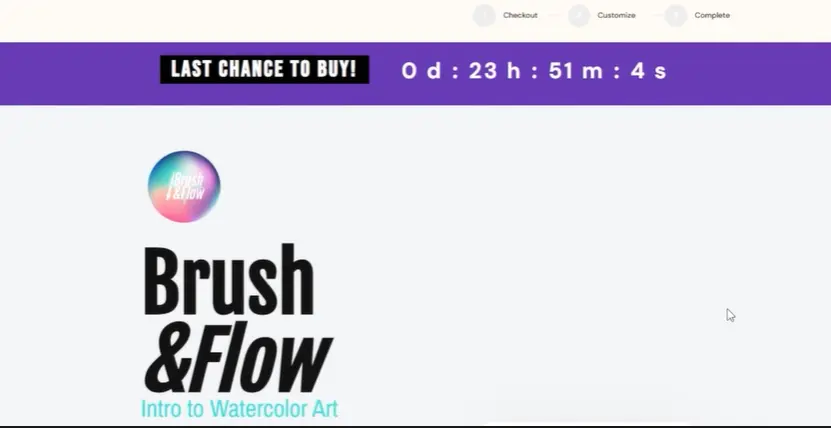
The evergreen timer starts the moment a visitor lands on your checkout page and counts down from a duration you set – for example, 24 hours or three days. Every visitor gets their own countdown, since it’s cached and based on when they first viewed your checkout.
Best for:
- Ongoing offers with a genuine reason for urgency, such as a launch price, early-bird bonus, or limited intake
- Evergreen funnels where you want consistent urgency for every new visitor
Fixed timer
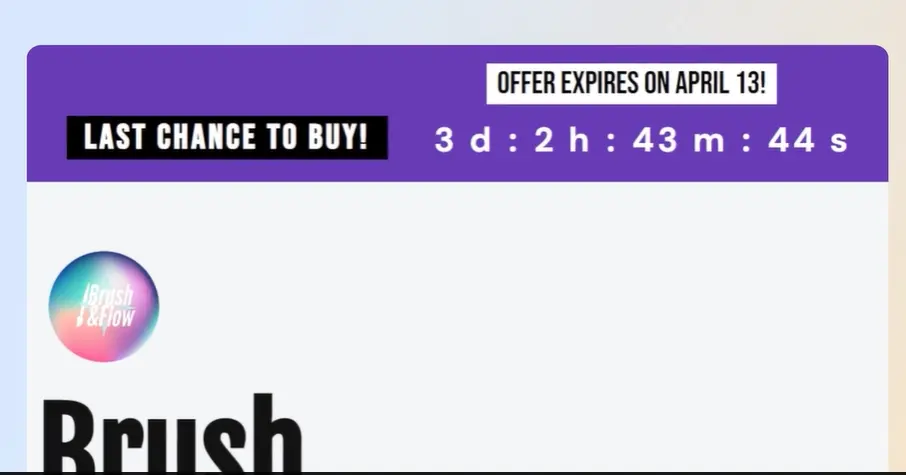
The fixed timer counts down to a specific date and time – the same deadline for every visitor.
Best for:
- Real launch windows
- Flash sales
- Bonuses that expire on a specific date
- In-person events and retreats (exactly what Allison needed!)
How to set up your countdown timer
Setting it up takes just a few minutes:
- Go to your product and open the Checkout tab
- Scroll to the Countdown section in your checkout template settings
- Drag the countdown widget into your checkout design
- Select your timer type: evergreen or fixed
- For evergreen, enter the days, hours, and minutes each visitor gets
- For fixed, use the date picker to choose your end-date and exact expiry time (such as midnight)
- Add a short message next to the timer – something like “Enrollment closes Sunday at 11.59pm EST!” or “Don’t miss out!”
- Set your expiry action (see below)
- Choose a background color – red performs well for urgency, but it’s also important to match it to your brand
👀➡️ RELATED READING | ‘How to Create a High-Converting Sales Funnel (Beginner-Friendly Guide + Templates)‘
What happens when the timer hits zero?
ThriveCart gives you three options:
- Reset the countdown: The timer restarts automatically. Useful for evergreen offers where urgency is tied to a bonus or special price, not a true cutoff.
- Replace with a message: The checkout disappears and a custom message takes its place, such as “This offer has now closed.” Use this when your deadline is genuine.
- Redirect to a page: Visitors are automatically sent to a different URL – for example, an “offer closed” page or a standard-price product. This is a clean, professional way to enforce a hard deadline.
Using scarcity the right way
Countdown timers are powerful. Here are a few principles to keep in mind:
- Only use a fixed timer when the deadline is real
- Evergreen timers work well for ongoing offers – but pair them with genuine urgency: a bonus, a launch price, or limited availability
- Avoid fake scarcity. Savvy buyers notice when a “closing tonight” timer resets every time they visit
Honest urgency builds trust and conversions at the same time.
👀➡️ MORE FROM THE BLOG | ‘How to Track Your Sales Performance Like a Pro With ThriveCart‘
What Allison could have done differently
With ThriveCart’s countdown timer, Allison could have:
- Set a fixed timer counting down to her enrollment close date
- Added a message like “Only six spots remaining – enrollment closes Friday at 11.59pm EST”
- Automatically redirected late visitors to a waitlist page once the deadline passed
- Converted far more of those “I’ll think about it” responses into confirmed retreat attendees
The checkout would have done the selling while she focused on preparing the retreat itself.
Ready to put countdown timers to work?
ThriveCart’s countdown timer is built in, quick to set up, and designed to convert. Whether you’re selling an online course, a coaching package, or an in-person event, a well-placed timer gives your buyers the nudge they need to say yes today.
