


Wyatt runs a fitness business built for guys who are serious about getting stronger but short on time. His audience is mostly men in their 30s, 40s, and 50s – professionals and family men who want real results from home-based resistance training, muscle-building plans, and practical meal guides. He sells downloadable PDFs, workout workbooks, and a subscription membership packed with home-friendly exercise programs. As you’d expect, he has a lot of checkouts, and as his offerings have evolved, not all are active.
Like many digital product creators, Wyatt tests everything. He runs A/B tests on his checkout pages, tweaks headlines, and experiments with different offers. Over time, that means his ThriveCart account has accumulated multiple product URLs for what is essentially the same offer. It was starting to get complicated and a little messy: affiliate links pointing to old variants, customer bookmarks going to test pages, and broken links scattered across his email sequences.
If that sounds familiar, the good news is that’s exactly the problem ThriveCart’s Smart Links feature was built to fix.
Key takeaways
- Smart Links let you redirect multiple product URLs to a single master checkout, so no traffic gets lost
- They protect affiliate commissions even when old or variant checkout links are clicked
- Setup takes just three steps inside your ThriveCart Products page
- Smart Links are available for Pro+ accounts with Stripe Connect+ enabled
Here’s a quick run-through of how it works, or read more below.
What Smart Links actually do
Smart Links let you designate one product as your “master” and then redirect any number of other products straight to it. Anyone who clicks an old link, an affiliate link, or a saved bookmark pointing to a redirected product gets sent to your master checkout automatically.
Which means no broken links, no lost commissions, and no manual cleanup.
For Wyatt, this means he can keep testing checkout pages without worrying about traffic leaking to outdated variants. Once a test is done, the winning checkout becomes the master, and everything else funnels right to it.
👀➡️ YOU MIGHT ALSO LIKE | ‘16 Tips to Streamline Your E-commerce Checkout Experience‘
Who this feature is for
Smart Links are a game-changer if you:
- Run A/B tests on your checkout pages and end up with multiple product URLs
- Have duplicate or older versions of products still floating around in your account
- Work with affiliates and want to make sure their links always land on the right page
- Have products that have been promoted in old emails, social posts, or ads with URLs you can’t easily update
- All URL parameters (including UTM values, coupon codes, and affiliate IDs) are carried through automatically.
How to set up a Smart Link in three simple steps
Setting up a Smart Link takes just a few minutes. Here’s how to do it.
In ThriveCart, head to your “Products” page and click the “Smart Links” tab. Then hit the “Create Smart Link” button in the top right corner.
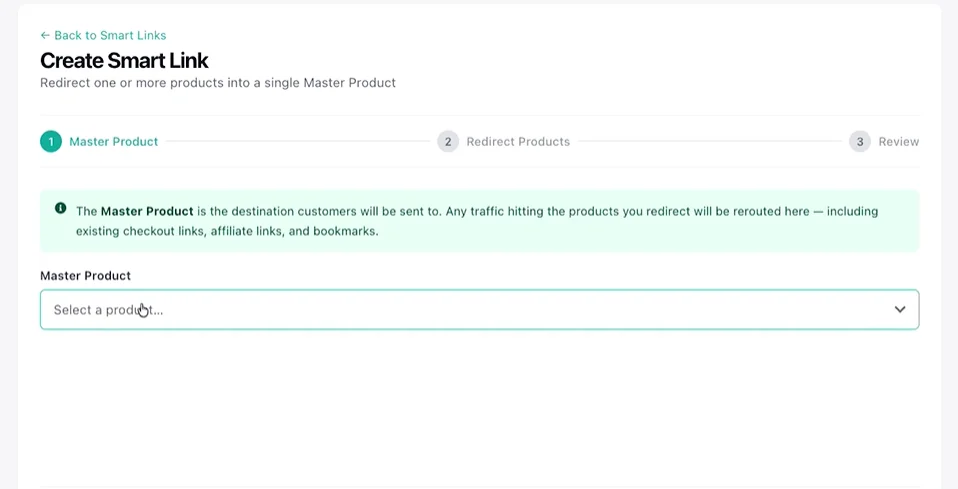
Step 1: Choose your master product
Use the “Select a product” dropdown to find and select the product you want all traffic to land on. This is your master checkout. Click “Next” when you’re ready.
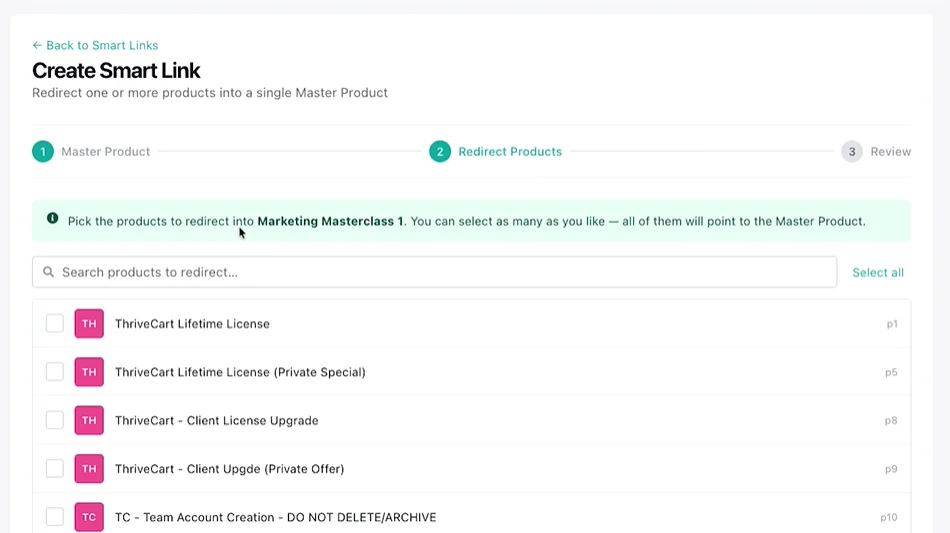
Step 2: Select the products to redirect
Check the box next to every product you want to redirect to the master. You can select just one or multiple products. You can search by name if your product list is long. Once you’ve selected all the variants, click “Next”.
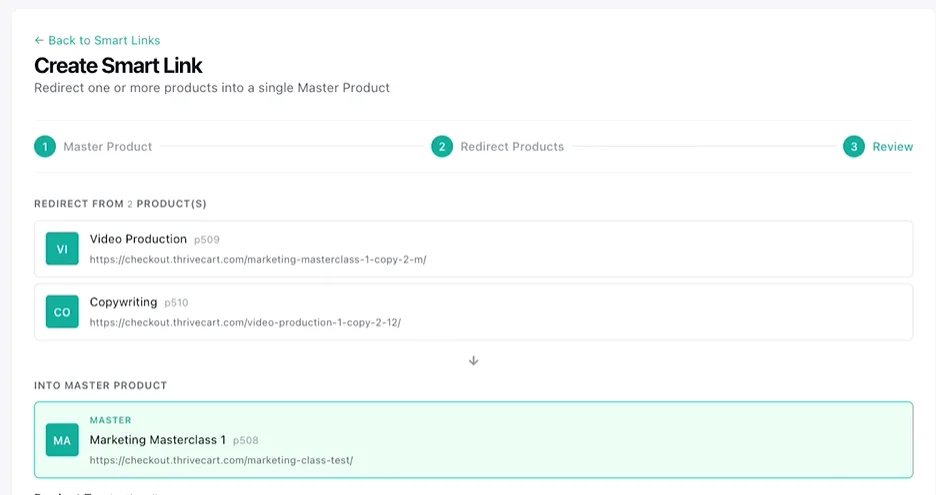
Step 3: Review and activate
You’ll see a summary showing your master product at the top and all your redirect products listed below. You can also add a product tag to your master product at this stage. If everything looks good, click “Create” to activate your Smart Link.
👀➡️ RELATED READING | ‘How to Build a High-Converting Sales Funnel in ThriveCart (Quick Step-By-Step Guide)‘
Managing your Smart Links over time
Smart Links go beyond a set-it-and-forget-it exercise – they’re flexible. Once a Smart Link is live, you can:
- Add more redirect products at any time using the “Add more products” button
- Edit product tags on your master product
- Toggle individual redirects on or off using the status switch
This makes it easy to manage ongoing tests, seasonal offers, or any time your product lineup evolves.
👀➡️ FOR YOU | ‘The Skills Crisis Gold Rush: 4 Ways to Turn Your Expertise Into a 6-Figure Education Empire‘
FAQ
Q: Can a product be in more than one Smart Link at the same time?
A: No. Each product can participate in only one active Smart Link at a time, whether as a master or as a redirect. If you try to add a product that is already part of an active Smart Link, ThriveCart will block the action and prompt you to remove it from its current Smart Link first.
Q: What happens to redirect products’ checkout pages?
A: Visitors are immediately forwarded to the master product’s checkout. The redirect product’s own checkout page is not shown while the Smart Link is active. Disabling the Smart Link restores normal access to both products’ individual checkouts.
Q: Can I use a redirect product as the master in a different Smart Link?
A: No. A product that is already serving as a redirect in one active Smart Link cannot simultaneously be the master of another. Remove it from its current Smart Link first, then set it as the master of a new one.
Q: Can anyone use ThriveCart Smart Link?
A: No, Smart Links are only available to merchants with Pro+ accounts and with Stripe Connect+ enabled.
Q: Will my coupon codes be affected?
A: It’s important to make sure that any coupons you want to apply to the master product are assigned to the master in that coupon’s settings – a coupon can only apply to products it is enabled for.
👀➡️ EXPLORE MORE | ‘From Simple Setup to Driving Sales: How Smart Creators Use Coupon Codes in ThriveCart‘
Smart Links: What’s next?
If you’re selling digital products, courses, or memberships and you’ve ever run a split test or had duplicate products in your account, Smart Links save you from a slow leak of lost traffic and missed revenue.
For creators like Wyatt – and for anyone who takes their checkout seriously – this is one of those features that quietly protects your income every single day.
Smart Links are available on ThriveCart Pro+ accounts with Stripe Connect+ enabled. Ready to get started? Head to your “Products” page and create your first Smart Link today. If you need help setting up your StripeConnect+ account, head here. For help with Smart Links, read our dedicated help page.
Not on ThriveCart yet? Pro+ is our most feature-rich plan, with a huge variety of revenue-boosting features, including custom domains, multiple order bumps, crypto payment options, subscription dunning, JV contracts, affiliate management, and much more!
Already on ThriveCart, but not on Pro+ yet? Simply log in to your dashboard to easily upgrade your plan.

