ThriveCart Academy: What’s Changed, What You Keep, and What Comes Next
Last Updated: October 15, 2026


The TL;DR
Note: ThriveCart Academy launched in May 2026, as ThriveCart’s new community-focused course platform. The information below is primarily aimed at our long-standing customers who may still be on the legacy course platform, Learn/Learn+. Brand-new users who joined from May 2026 onward may find the info interesting but not 100% relevant to them. |
A clearer path forward for Learn and Academy
First, we want to acknowledge that mistakes were made in how we launched ThriveCart Academy and how we approached the transition from Learn and Learn+. Migrations were far more difficult than they should have been, and too many creators spent time chasing problems, helping students gain access, and working around issues we should have addressed before launch.
We underestimated both the complexity of moving established course businesses and the time, clarity, and control you needed to make that change confidently.
We are sorry for the disruption.
We sought feedback directly from customers, including through our first Customer Advisory Council meeting that took place in September 2026. We heard your experiences, discussed the challenges, and reviewed the transition together. These meetings will now take place quarterly, giving customers a regular voice in important product decisions.
Our revised Learn/Learn+ policy
We are significantly slowing down the timeline for merchants to migrate from Learn and Learn+ to Academy.
Phase I: Learn and Learn+ will remain open for new course creation throughout 2026.
Phase II: In 2027, in Learn and Learn+, you will still be able to edit courses and add new students. New course creation will move to the Academy platform.
Phase III: In 2028, Learn and Learn+ will become read-only, with creators and student able to retain access to previously purchased courses.
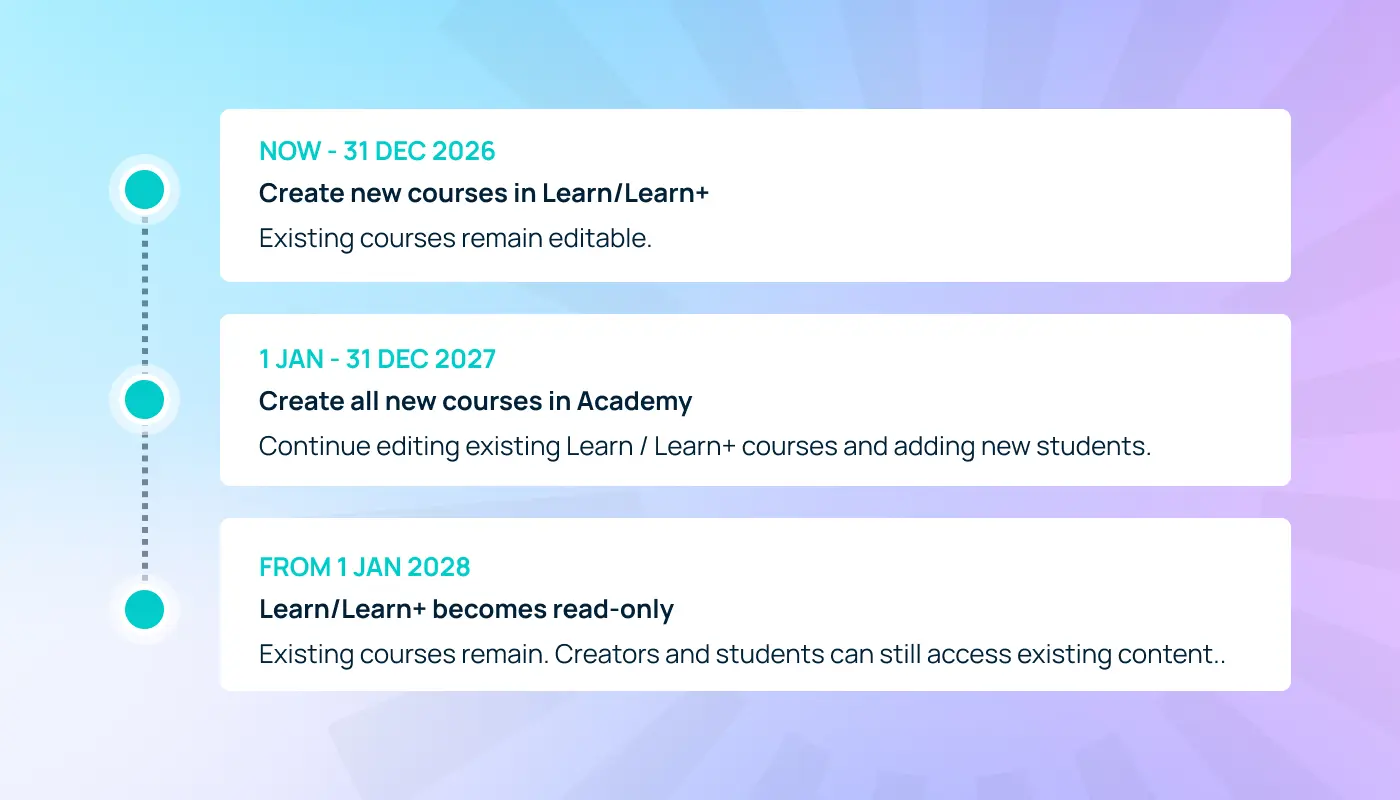
Throughout, Learn and Learn+ will receive maintenance only.
ThriveCart Academy is where we will build new capabilities. Ending new course creation in Learn and Learn+ does not end access to the existing courses that you have there.
What Academy access do you get? Existing Learn and Learn+ users receive grandfathered access to Academy’s courses module. Moving to Academy does not require you to buy an Academy subscription to continue delivering courses with your existing features on the new platform. Your course features are matched to your existing Learn or Learn+ access, with extras including quizzes and certificates. Learn+ users retain their Learn+ course features; they are not reduced to the Learn feature set. |
Learn and Learn+ users:
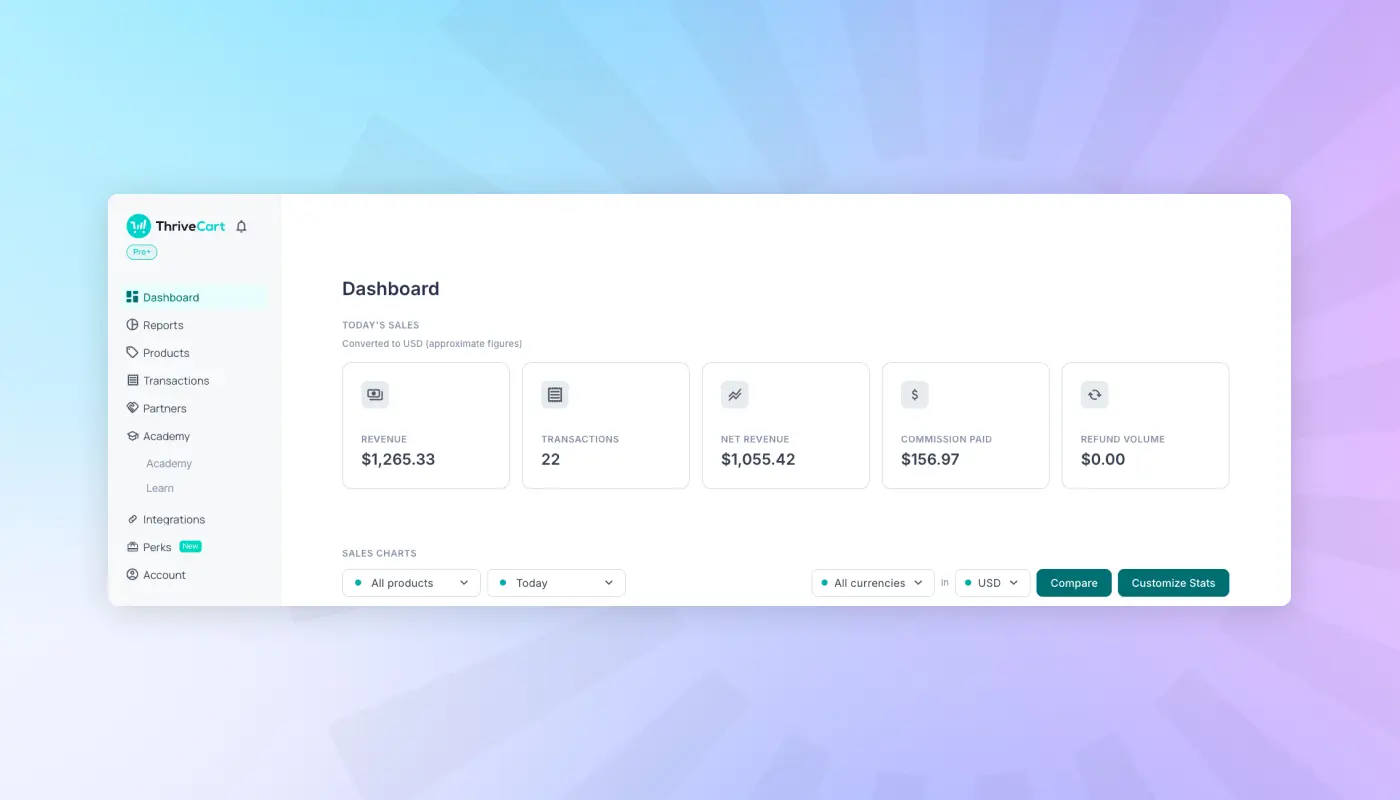
Your grandfathered Academy access covers courses. New features like quizzes and certificates are included for free. You don’t need a card to sign up, this is already accessible through your ThriveCart account, accessible in the left-hand menu:
Subscriptions are required for video, file, and audio hosting (available in courses and communities) and for Community access.
EXCLUSIVE OFFER: Upgrade to Pro+ annual for just $295 when you hold a valid lifetime license! That’s a 72% saving versus a new Pro+ monthly subscription! Claim your offer and unlock communities, video, audio, and file hosting and delivery across Academy and checkout pages, plus revenue-boosting ThriveCart tools like our powerful affiliate platform, multiple bumps, tax-inclusive pricing, advanced subscriptions, advanced reporting and much more. 82% see a payback in 60 days or less. Claim your offer, exclusive to lifetime license holders. |
A new front door to your business
The Academy you see today is substantially different from the product we launched in May 2026. Since then, we have improved the experience students arrive in, the tools you build with, and the workflows that connect purchases to learning.
The biggest visible change is the completely new student homepage. The original experience presented a collection of widgets showing accessible content and content behind purchase gates. It lacked the structure and polish to bring your courses, communities, and offers together as one coherent experience.
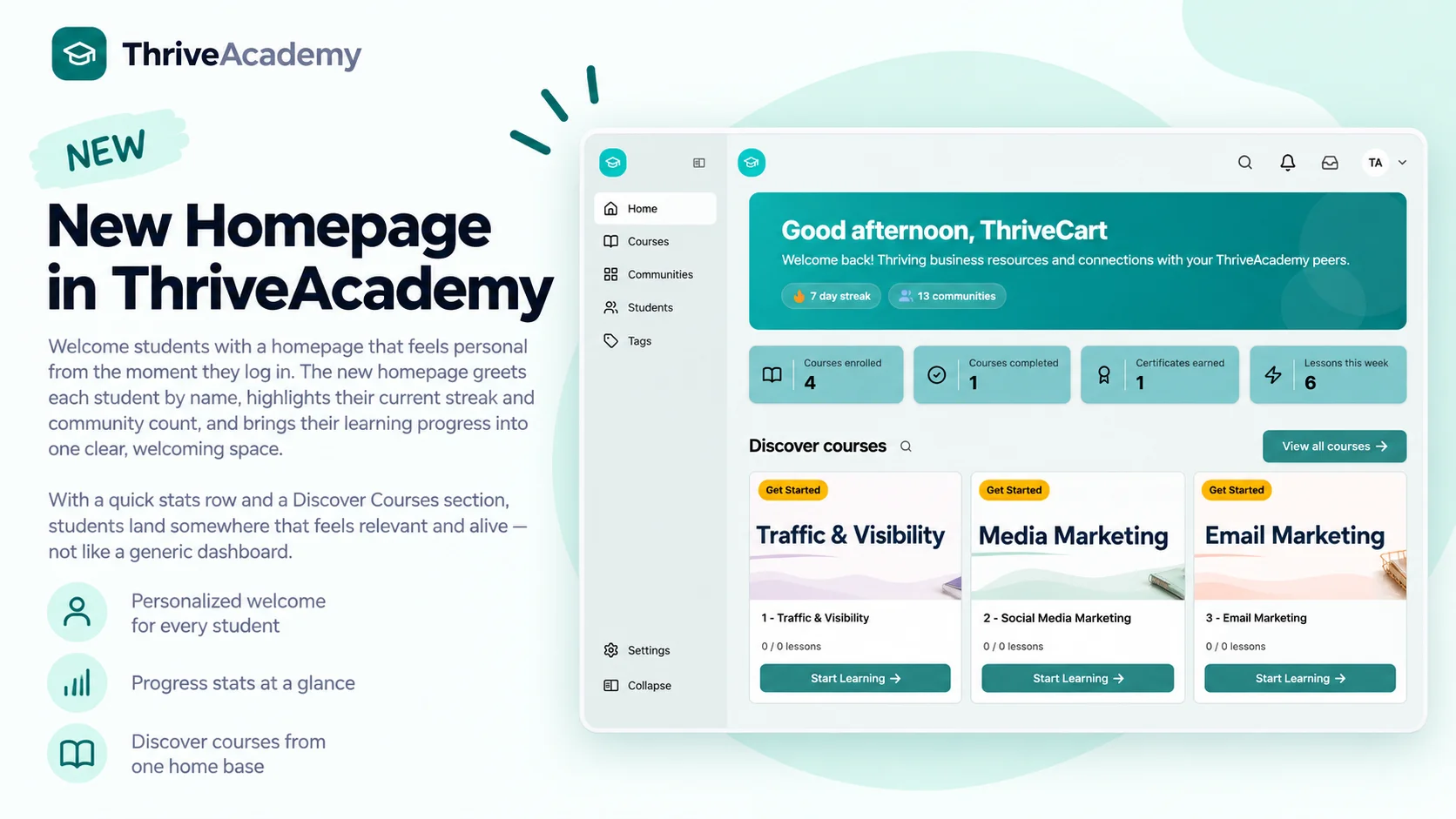
The new homepage gives students a welcoming, personalized, and branded starting point. New students can see where to begin. Returning students can use “Jump Back In” to continue their next lesson, see their progress, and find the courses and communities they already belong to.
For you, it’s a configurable space to arrange and style to fit your brand. Combine welcome messaging, video, text, HTML, and custom content with course lists, community lists, progress, and discovery blocks. Mobile-friendly layouts carry that experience onto smaller screens.
It also becomes part of your sales journey. Discovery sections and branded calls to action can introduce additional courses and communities, with ThriveCart checkout links giving students a clear next step. Your homepage now helps people learn, connect, and discover more of what you offer.
Making the move to Academy easier
We know that transferring content, enrolling students, and supporting their language needs can hold up your move to the Academy. These are priorities as we work to make that transition easier.
Coming later in October 2026: self-serve migrations
We underestimated what was required to migrate more than 13 million accounts from Learn and Learn+ to Academy. Although we’ve made improvements and completed several reruns, we’re now giving you the power and control to manage your own migration to ensure you’re 100% happy with the results.
The self-serve tool will let you start your own Learn(+)-to-Academy migration, generate a fresh export, and preview what will move. It is designed to let you review the transition and add content without overwriting existing Academy content, moving away from a manually coordinated support-led process.
We will explain the content and workflows it supports when available, so you can plan your move with clear information.
Bulk enrollment and language support
CSV uploads are planned to let you add multiple students and enroll them into courses or communities without repeating the process individually. A review step, validation, and clear errors will help identify rows that need attention before confirmation. Previously, this was a Learn+ feature – we are extending this to all Learn users, also.
Language-support improvements will expand the experience across Academy interface text and emails for creators and students. Coverage will grow as work rolls out.
Stronger tools from creation to delivery
The new homepage is the most visible part of a much wider program of improvements. Across the releases since launch, we’ve addressed the practical issues affecting creators and students every day.
A more dependable course builder
We’ve improved lesson organization, drag and drop, layouts, formatting, autosave, and previews. Editor controls stay accessible, content blocks are easier to configure, and lesson duplication across modules preserves more of your work. Content pasted from Word or Google Docs also retains more of its formatting.
Better media and student access
Video and audio uploads, processing, embeds, and playback have received extensive improvements, including migrated video playback and recovery from interrupted uploads. Sign-in, password resets, welcome emails, login links, and account switching have also been improved. Course-only students can access their learning without needing to join a community first.
More reliable learning and community tools
Updates cover quizzes, video assessments, attempts, results, and certificates, alongside more accurate completion reporting and drip conditions that can combine time intervals with module completion. Community feeds, discussions, announcements, member counts, settings and navigation have all received attention, as have branding and custom-domain journeys.
Custom domains
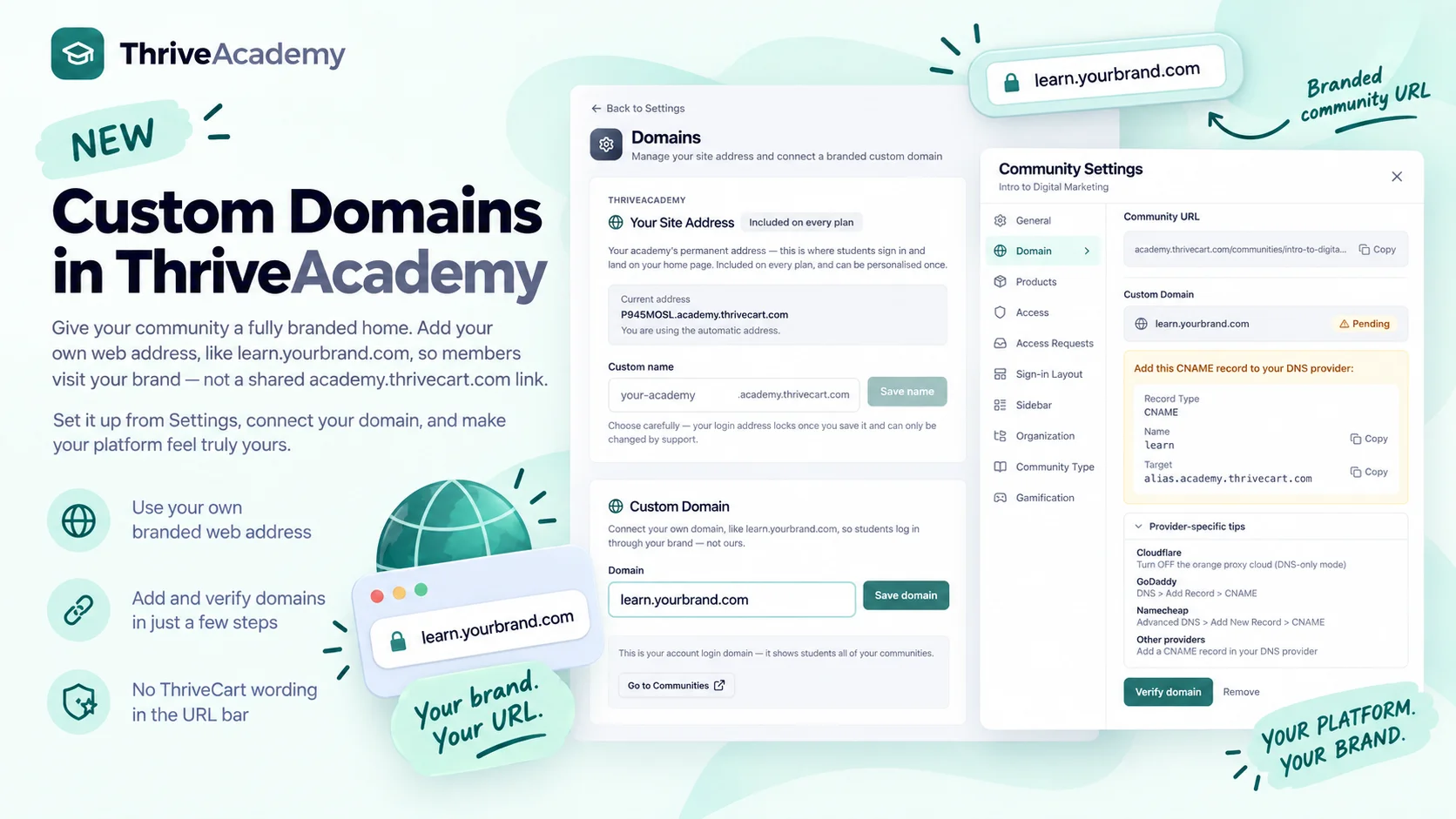 Custom domains are now configurable at the account level (apply a domain across your Academy by default), course level (use a specific domain for one course), and community level (use a specific domain for one community).
Collections
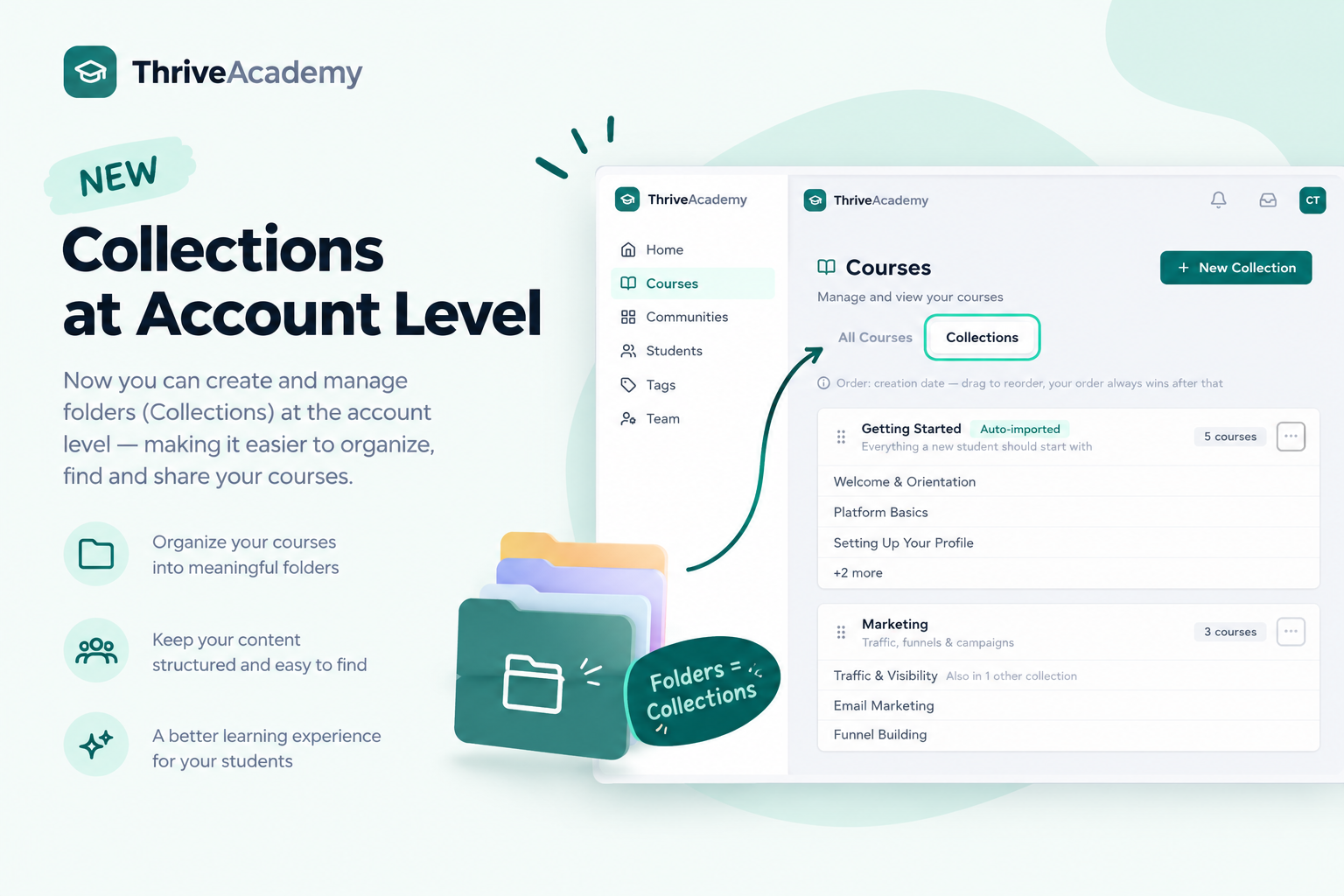 Course collections are an organizational tool that helps you group courses into categories such as:
- Beginner courses
- Advanced courses
- Certification programs
- Topic-specific learning paths
- Courses for different audiences or membership levels
Courses assigned to a collection appear together, while ungrouped courses remain available in a default section. This gives students a clearer view of your content without forcing you to rebuild your course structure. It can also make a growing catalog feel more intentional and easier to navigate.
Sales funnels connected to content access
Academy is now available in ThriveCart’s fulfillment settings. Main products, order bumps, upsells, and downsells can automatically grant access to mapped Academy content. When a customer accepts an additional offer, they can receive the relevant course, community, or space without you manually provisioning access afterwards.
Course & Community bundles
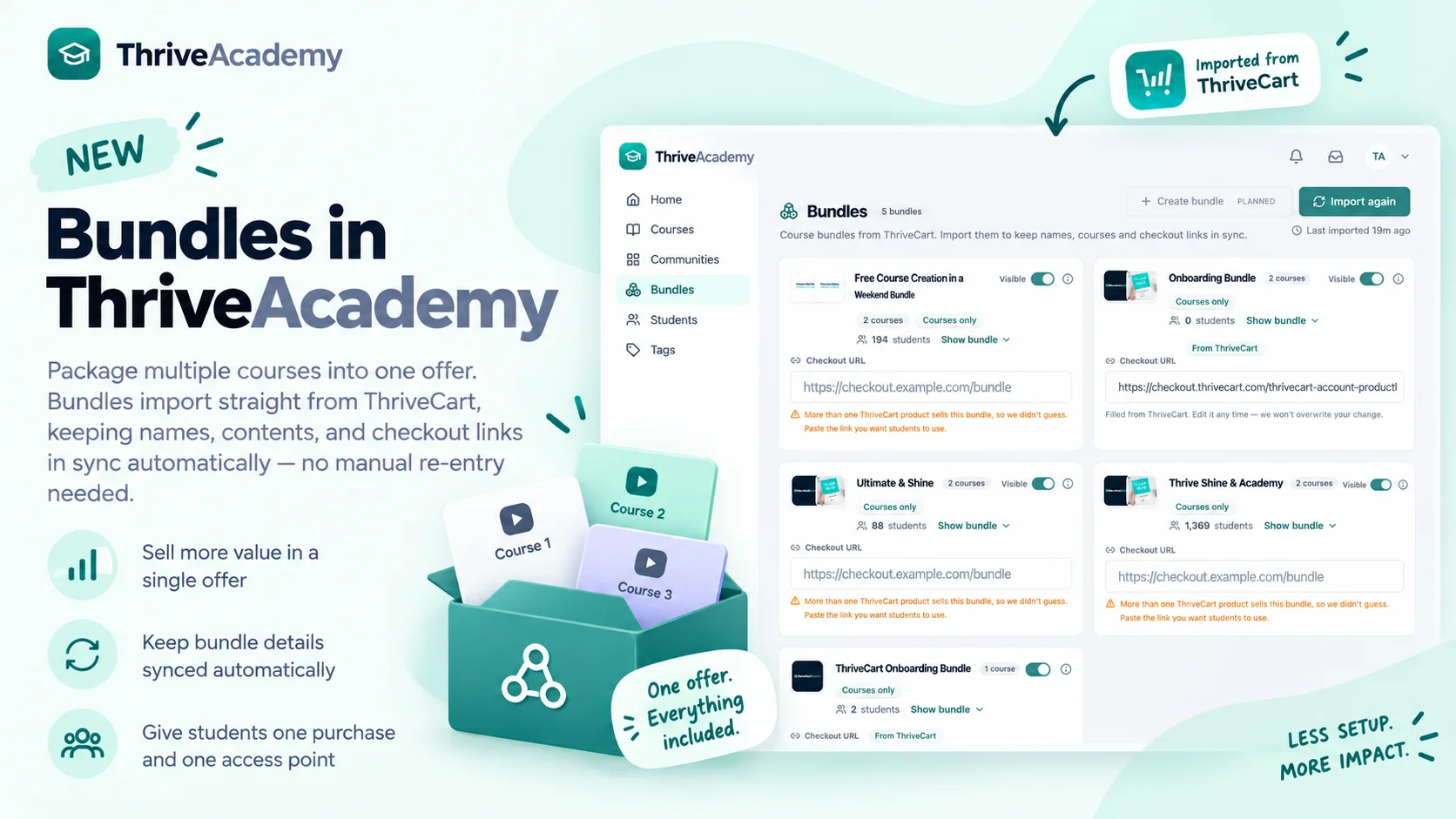 You can create brand-new bundles or import existing ThriveCart Learn+ bundles into ThriveCart Academy via account sync, helping long-standing creators on Learn+ migrate bundle names, course relationships, enrollments, and associated purchase links.
Upsell and downsell fulfillment
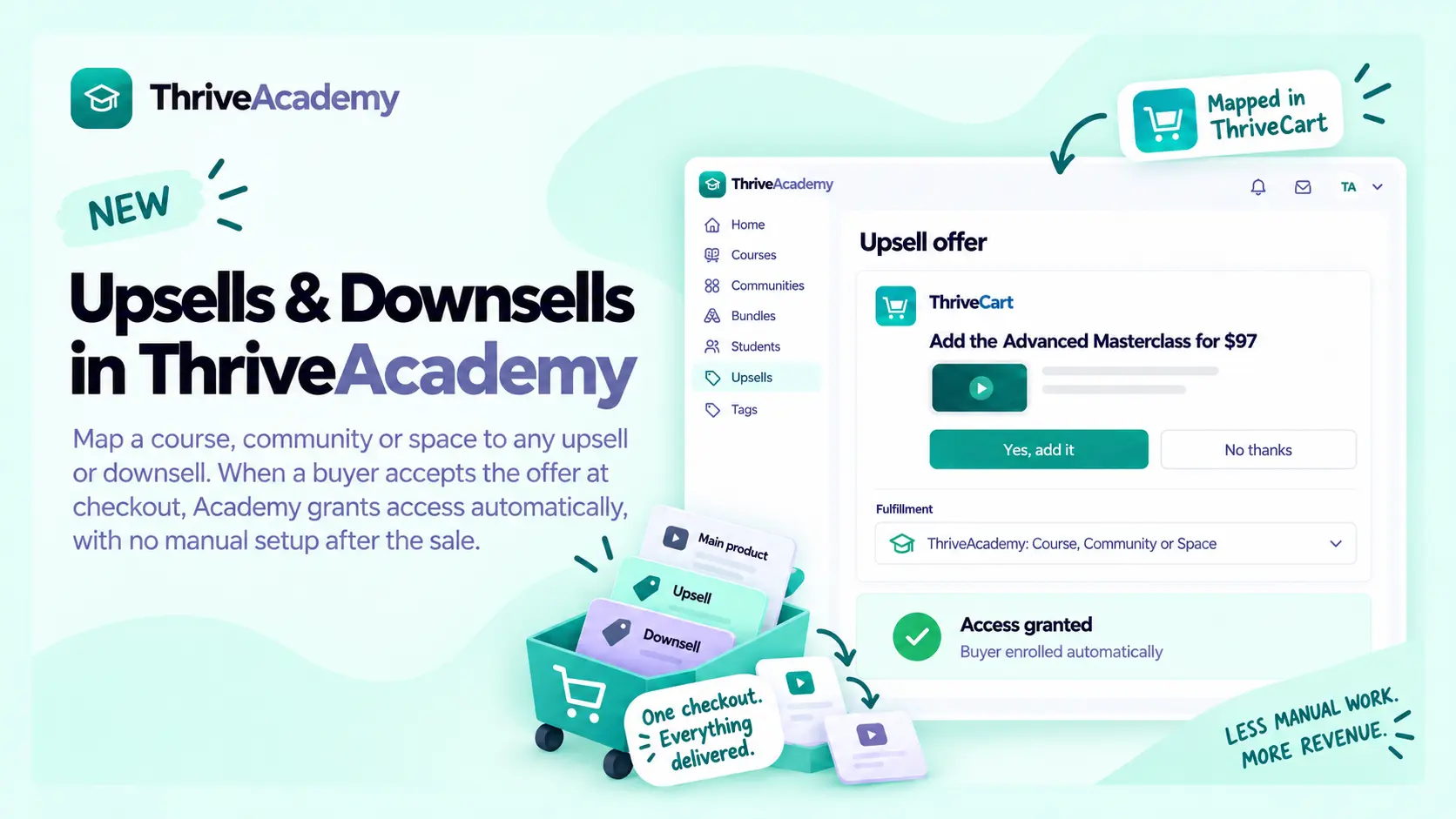 You can now map an offer to a course, community, or space through ThriveCart fulfillment settings. When a customer accepts the offer, Academy automatically grants the relevant access and sends the usual access-ready notification. This builds on main-product and order-bump fulfillment, and existing ThriveCart tools for bundles and sales funnels.
What’s next for ThriveCart Academy?
If you tried Academy at launch, your first impression was of a very different product. We know confidence comes from consistent delivery, and we will keep improving the experience with your feedback.
Proper subscription management for ThriveCart & ThriveCart Academy
This is one of the most important parts of the next phase and a huge upgrade for subscription management in Academy and ThriveCart more broadly.
ThriveCart currently offers upgrade and downgrade paths with proration and access/revoke options, but each product is set up individually. This is functional, but not perfect, and relies heavily on showing new checkout pages at each step in the process.
This is all about to change!
A membership doesn’t stay the same forever. Someone may start on an entry-level plan, move into a higher tier, add a course or bundle, or decide they need a lower-cost option, well after the funnel has ended. You need a clear way to support those changes, and your students need to understand what they’ll pay and what access they’ll receive.
We’re developing that capability across selling, plan changes, student payments, and access – you’ll soon have a complete subscription billing experience to manage a growing course, coaching, and membership business.
Upgrades and downgrades within your plans
The direction is a more complete subscription lifecycle: clearer ways to upgrade or downgrade within your plan structure, understand the price difference, see when a change takes effect, and review any applicable credit. Students should be able to make an informed choice, with billing and access reflecting that choice.
In addition, when a student downgrades, you’ll also be able to show powerful Retention Offers to reduce churn by offering a discount, pause, or different plan instead of canceling.
The roadmap introduces this in stages. Retention Offers are already available in your product settings. Q4 work focuses on the connected billing experience, clearer upgrades, and student payment management.
Sell within the community experience
Planned in-community purchasing uses an in-app pop-out checkout, with products and checkouts pulled directly from ThriveCart. Offers, coupons, and countdown timers can carry through from the community into the purchase experience. Students still complete a checkout; it happens within the community journey. This is upcoming work, separate from the upsell and downsell fulfillment currently available.
A clear home for every purchase
Subscription management also depends on students understanding their payments. Previously, billing information was scattered across emails and links, and students could be sent to third-party pages such as ThrivePay Installments to understand payment plans. That created confusion and more support work for creators.
The new Student billing view will bring that information together in your branded space, organized into Subscriptions, Payment plans, Programs (fixed-term subscriptions), and Single transactions. Students can filter by plan and turn on Active to hide finished or inactive items. That preference is remembered.
What have I paid, and what do I owe?
Also coming soon, every payment plan will show payments completed, the amount paid, remaining balance, and the next payment date and amount. A student will be able to see Payment 2 of 6 and expand the full schedule, with clear statuses: Paid, Scheduled, Payment failed with the retry date, Refunded, and Canceled. Future payments will be explicitly marked as scheduled and not yet charged.
Students can take action without asking you
Students will be able to update the card attached to each subscription or split payment separately, since each purchase can use a different card. ThrivePay Installments also explains the amount reserved on the card. Students will be able to view a full invoice on screen, download or print it, and buy extra credits where you offer them.
Where you allow self-cancellation, students will be able to cancel a subscription and see what they’ll lose before confirming. Eligible purchases can be withdrawn during the 14-day EU withdrawal period. Programs, split payments, and installments cannot be canceled through the view, but can still be withdrawn from within that window.
A familiar account, language and support route
Students will be able to switch accounts if they’ve bought from multiple creators; arriving from Academy opens the relevant creator account. The view supports English, French, Spanish, German, Italian, Dutch, Danish, Norwegian, Brazilian Portuguese, and European Portuguese. Prices will retain each purchase’s currency, and support links will use the email set in your product settings.
Clear billing builds trust. It can reduce routine tickets, help students fix declined cards quickly, and reduce misunderstandings that contribute to refund requests and chargebacks. They spend less time searching for answers and more time in your learning experience.
Your brand. Your rules. Better retention.
The Student billing view is also a tool you can shape around your business. It brings together presentation, cancellation rules, retention options, and feedback, with controls at both the account and product level.
See the experience before students do
Use “View as” to preview the page as a specific student, including their photo, or as a generic customer. This makes account management and support easier. You’ll be able to check what they see and use that same context when answering a support question.
Edit mode will let you customize page and card backgrounds, borders, font color, button colors and text, status and notification colors, and ribbons with effects. Billing becomes a recognizable part of your brand rather than a disconnected administrative page.
Offer a useful alternative to leaving
When a student goes to cancel or withdraw, product-level retention offers can present a discount or a pause, such as three months, with a configurable countdown timer. You’ll be able to decide which offers fit each product.
A fully editable questionnaire after cancellation or withdrawal will also help you understand why students leave. Account-wide switches will control self-cancellation, retention offers, and withdrawal, with product overrides and a searchable overview for managing individual products.
Make the next offer easier to discover
Publish “New in your account” cards with an image, text, and an in-app link or external URL. They will give you a place to introduce relevant courses, memberships, or offers while customers are already in your account.
Learning, community and selling together
Running courses, conversations, events and payments across separate tools creates work for you and a fragmented journey for students. Our planned Q4 community upgrades bring those experiences closer together, building on the new Academy homepage, which is already available today.
One aggregated home for each student
Students will have their communities, courses, events, and reward points together on one page, alongside a personal welcome video and a “What’s happening” feed. The aim is a clear starting point that reflects their access and participation, rather than a collection of disconnected destinations.
A richer feed with more reasons to return
Planned feed capabilities include rich-text posts, images, GIFs, emojis, polls, countdown posts, and Instagram-style status reels. Featured and pinned content can make important updates easy to find. New-member welcomes and course-completion celebrations, linked to the relevant course, will help make progress and participation visible.
Email notifications and messaging
Email notifications are coming to Academy, alongside messaging updates and unsubscribe controls. These are planned community improvements, and we will explain notification coverage and member controls as they become ready.
Reward points with useful benefits
The planned reward points system connects activity, purchases, and event attendance to rewards, with accelerators and a leaderboard. A path to graduation will help members understand their progress, while certificates can be shared in the community feed or externally.
Referral links can earn points, and points can be redeemed for discounts, free courses, or custom membership tiers (such as Pro or VIP lounge). The goal is to give participation a useful connection to your learning and membership offer.
Bring your audience together, live
Live events and livestreaming are a major part of the next phase of Academy. Recorded courses give students flexibility. Live sessions give students access to you, timely interaction, and a shared experience that gives members a reason to show up together.
The planned event experience will support livestream, in-person, and hybrid events, connecting registration, attendance, learning, live offers, and recordings more closely to your courses and communities.
You’ll also be able to set different rewards for attending live, watching past events, participation during the event, and more!
Before: a clearer path to the event
Build events with speaker lineups, reusable bios, and agendas that update automatically. Guest speaker access will support bringing contributors into the experience, while multi-community events let you connect audiences across more than one community.
Share links and QR codes will make events easier to distribute. Planned lead-generation registration through ThriveCart and Apple or Google Wallet tickets will connect sign-up to the event experience, including for in-person attendance.
During: teach, involve, and sell
Livestreaming creates a place for workshops, coaching sessions, launches, and guest conversations. Planned live quizzes will let you check understanding and involve participants. Watch-time points can recognize attendance as part of the wider reward points system.
Live offers connect the session to a next step. Introduce a relevant course, program, or membership while the audience is engaged. Alongside planned in-community purchasing, this brings teaching and selling into a more connected journey, instead of asking participants to find their way through separate tools.
After: extend the value of the session
Recordings of past sessions will give members a way to revisit what they learned or catch up if they couldn’t attend. The event becomes part of the ongoing learning experience, alongside your courses, community conversations, and future sessions.
One connected event journey
Register / Attend and participate / Explore an offer / Return to the recording
These event and livestreaming capabilities are planned. We will launch when ready and explain supported workflows and plan availability as they become available.
Understand and manage your members
As communities grow, creators need more than a feed. They need ways to protect the experience, understand members, and take useful action without managing every detail individually.
Moderation that scales with you
Planned controls include post and comment approvals, daily posting limits, slow mode, scheduled posts and comments, and posts restricted to certain member levels. A staff audit trail will show who did what, while polite notices help members understand moderation actions.
A clearer view of each member
Student profiles are planned to bring together lifetime value and activity by community and course. Multi-select filters and segments, bulk messaging and email, and CSV import and export will help you work with relevant groups.
Auto-access from ThriveCart checkouts or lead forms, waitlists and welcome-point bonuses will connect acquisition, enrollment, and the first member experience more closely.
Analytics across the whole journey
The planned analytics scope covers revenue, completion, lesson drop-off, downloads, events, referrals, and reward points, alongside trial-to-paid conversion, retention, and churn. That gives creators a broader basis for understanding what’s working and where members need more support.
What follows, and how we’ll keep listening
Q4 priorities: features launch when ready
Community homepages and enhancements; email and messaging; live events; member and team tools; gamification and reward points; community analytics; connected billing.
These are our planned priorities for the quarter, but testing, quality and readiness for usage at scale will determine exact public release timing.
A transition shaped by your feedback
Our responsibility is to give you a dependable platform and a clear path forward: maintain Learn/Learn+ under the revised policy, preserve your grandfathered course access, make migration easier, and continue strengthening Academy.
The quarterly Customer Advisory Council will continue to help shape those priorities alongside the feedback you share every day. Thank you to everyone who has reported issues and helped us improve.
Conclusion
To sum up, Learn and Learn+ are not going away overnight. We’re phasing out new course creation in three stages so you have more time and control:
- Through 2026: You can continue creating new courses in Learn and Learn+.
- During 2027: You can edit existing courses and add students, but new course creation will move to Academy.
- During 2028: Learn and Learn+ will become read-only, while creators and students retain access to previously purchased courses.
We’ve already made significant improvements to ThriveCart Academy, and will continue making it better throughout 2026 and beyond. When you move from Learn or Learn+, you’ll receive equivalent Academy course access at no extra charge. This includes new features such as quizzes, which were not available in Learn and Learn+. Communities aren’t included in this grandfathered course access, but you can upgrade to use Academy’s community features whenever you’re ready.