

Meet Mary. She’s 32, lives in Colorado, and runs a coaching business that helps small business owners get started and grow online. She’s got a solid membership going – close to 1,000 people paying every month for business templates, training, and weekly Q&As.
But there’s a problem: failed payments are high. Why is that? Everyone seems engaged… so it’s not voluntary churn, but nevertheless, Mary may lose a handful of customers each month simply because payment providers cancel subscriptions if failed payments recur. Not to mention that Mary has to run around chasing up customers, which isn’t pleasant for either party.
That’s exactly the problem ThriveCart’s new Anchored Subscriptions feature was built to solve.
|
Key insights, at a glance:
- You can now pick one single day of the month for every monthly subscriber to be billed – no matter when they actually signed up.
- You pick the billing date, from the 1st to the 28th of the month.
- The days between someone signing up and their first “real” billing date can be free, or you can charge a smaller, prorated amount. It’s your call.
- Nothing changes for people already subscribed to you. This only affects products where you’ve turned the feature on.
|
Here’s how it works.
So what are Anchored Subscriptions, exactly?
Up until now, ThriveCart billed people based on the day they signed up. Someone joins on the 14th? They get charged on the 14th every month after that. Simple, sure – but it means every customer is on their own little billing schedule, with no consistency across the board.
Anchored Subscriptions flip that around. You pick one day – let’s say the 1st – and every monthly subscriber gets billed on that day, no matter when they actually joined.
Here’s what’s new:
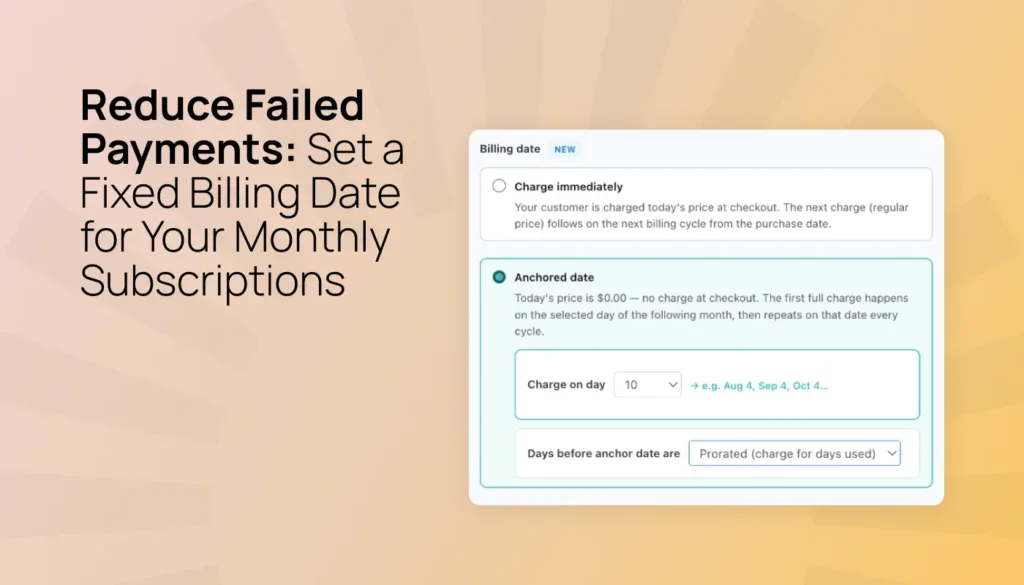
- There’s a new “Billing date” option in your subscription settings, right under “Billing frequency”
- You get two choices:
- Immediately: This is how it’s always worked, charging on the day someone signs up, or…
- Anchored date: Charges everyone on one day you choose, anywhere from the 1st to the 28th of the month (avoiding month-end edge cases)
- Pick “Anchored date” and a little day-picker pops up so you can choose exactly when billing happens
One thing to note: this option only shows up if your trial period is set to “None.” If you’re already using a trial, you don’t really need anchored billing – the trial is already handling that timing for you.
What happens to the gap between signup and the first billing date?
Good question. Say you’ve set billing to the 1st of the month, and someone signs up on the 20th. That leaves 11 days before their first “real” charge. So what happens during that gap?
You’ve got two choices:
- Free period – they get those 11 days for free, then billing kicks in on the 1st
- Prorated charge – they pay a smaller amount for those 11 days, then move to full billing on the 1st
Which one you pick really depends on your business and your audience. A free period can make checkout feel more inviting and remove a little friction. Proration means you still get paid for that in-between time.
Why does a consistent billing date actually matter for your business?
If you’re running a membership, a coaching program, or any kind of monthly subscription, having everyone bill on the same day makes life easier – for you and for them.
Here’s what you get out of it:
- Fewer failed payments – payments occur when you think balances will be higher (say after payday) to reduce failed payments and awkward conversations.
- Easier bookkeeping – when everyone’s billed on the same date, tracking and forecasting your monthly revenue gets a whole lot simpler.
- Fewer confused emails – your members know exactly when to expect a charge, so you get fewer missed payments and “why was I charged?” messages.
- A more professional feel – a consistent billing date just comes across as more polished and trustworthy.
- Cleaner data – if you like to track how cohorts behave in month 1, month 2, month 3, and so on, having everyone on the same schedule makes that a lot easier to measure.
Who’s this actually for?
Anchored Subscriptions are built for:
- Anyone selling monthly memberships, coaching programs, or digital subscriptions (ongoing and limited subscriptions; not split pay)
- Merchants who want everyone billed on the same date, instead of scattered across the calendar
- Sellers who aren’t currently using a trial period on that particular product
How to turn it on
Setting it up is simple and only takes a few minutes:
- Go into your subscription product’s settings
- Find the “Billing date” field – it’s right below “Billing frequency”
- Select “Anchored date”
- Pick which day of the month you want billing to happen
- Decide whether that gap period is free or prorated
- Save it, and you’re done
Your current subscribers won’t be affected at all. Anchored Subscriptions only kicks in going forward, and only on the products where you’ve actually turned it on.
→ For more on setting up your checkout’s product and pricing options, check out our support guide on setting your checkout’s product and pricing options.
FAQ
Q: Does this work with all billing frequencies?
A: Not yet. Anchored Subscription billing dates only work with monthly subscriptions for now. Weekly, quarterly, and annual plans aren’t supported. More options will roll out across the rest of 2026 and in 2027.
Q: Will my existing subscribers be affected?
A: No. Turning this on for a product doesn’t change anything for people who are already subscribed. It only applies to new signups on products where you’ve enabled it.
Q: What if I’m already using a trial period?
A: Then you won’t see the anchored billing option at all – it hides itself automatically. Since your trial already controls when the first charge happens, you don’t need this feature in that case.
Q: Can I pick any day of the month?
A: You can choose anywhere from the 1st through the 28th. Days 29, 30, and 31 aren’t available, just to keep things consistent across months of different lengths (nobody wants to deal with February billing weirdness).
Q: What’s the real difference between a free gap and a prorated one?
A: A free gap means your customer doesn’t pay anything for the days between signing up and the anchor date. A prorated charge means they pay a smaller amount for those days. Either way, full billing kicks in on the anchor date from then on.
Q: Can I use this on a brand-new product I’m setting up right now?
A: Yes! You can turn it on from day one for any new monthly subscription, or add it to a product you already have – it’ll just apply to new signups going forward.
When can I start using Anchored Subscriptions?
Anchored Subscriptions are available on all ThriveCart plans, offered as part of our bumper Fall 2026 update. Head to your ThriveCart dashboard to get started.
Not yet using ThriveCart? Start a free 30-day trial and explore revenue-focused features, including order bumps, upsells, downsells, and high-converting checkouts.

