


Online education is now a $221 billion industry worldwide, and it’s still growing. By 2030, over 1.2 billion people are expected to be learning online. That’s not a niche anymore. That’s a shift in how the world acquires knowledge and skills.
If you’ve been sitting on an idea for an online course, the timing has never been better. And the upside is real: one recording cycle can generate revenue for years, while your students learn at their own pace from anywhere in the world.
Here’s what makes it worth doing:
- Global reach: anyone online can enroll, removing geographic limits.
- Flexible and convenient: students learn at their own pace on any device and revisit lessons anytime.
- Cost-effective: no venue, travel, or printed materials, lowering costs for both you and your students.
- Diversifying your income: turn one-to-one expertise into scalable, one-to-many revenue.
Below is a practical, ten-step playbook that drives people to sell it on a platform that converts.
Key takeaways:
- Validate the audience and the outcome before you record. The most successful online courses solve one specific problem for one specific learner.
- Structure beats production polish. A clear module-and-lesson curriculum drives completion more than studio-grade video.
- With ThriveCart, you can create online courses and publish in-depth lessons in minutes.
If you want one platform that hosts your course and runs your checkout, see how ThriveCart’s LMS, ThriveAcademy, pairs with the cart that powers your launch.

Before we get to the ten steps, you might also want to watch this short video that ranks the best and worst digital products to sell, including online courses. Hint: it’s good news! Watch it here.
Step 1) Identify your audience and niche
Before you dive into the course creation process, pinpoint your target audience and niche. Who are you teaching, and what do they desperately want to learn?
Confirm demand before you commit
Before you map out a single module, make sure there’s a real market for your course topic. Pull search volume data on the core problem your course solves, scan the top-ranking results, and ask five to 10 members of your warm audience the exact phrases they use to describe their problem. If the demand is real, the existing content is thin, and your audience can repeat their problem in their own words, you have a niche worth building for.
Pre-sell before you produce
The strongest validation on any course is a paid waitlist or beta cohort at 30% to 50% of your eventual price. If 10 to 20 people pay you in advance, the niche is real; if they don’t, fix the offer before you record.
👀➡️ ADVICE FOR THE LIFESTYLE CREATOR NICHE | ‘From Influence to Independence: The New Blueprint for Lifestyle Creators‘
Step 2) Define clear learning objectives
Once you know who you’re teaching, you need to know what they will be able to do by the time they finish. Learning objectives are like a contract between you and your students. Vague objectives produce refunds and poor reviews; specific ones build an effective online course your buyers can trust, which, in turn, leads to more sales for you.
Write each objective as a measurable outcome
Use this format: By the end of this module, you will be able to [specific, observable result].
Example: By the end of this module, you will be able to map your customer’s buying journey on a single page and write your sales page headline.
One outcome per course, one outcome per module
- State the course-level outcome in one sentence. This becomes the headline of your sales page.
- State a module-level outcome at the start of every module.
- State a lesson-level outcome at the start of every lesson.
| ThriveCart tip: Build your course around one clear transformation. Break it into modules using Bloom’s Taxonomy, moving students from understanding concepts to applying them. This creates a solid learning architecture with visible, incremental progress. |
👀➡️ RECOMMENDED READING | ‘The Skills Crisis Gold Rush: 4 Ways to Turn Your Expertise Into a 6-Figure Education Empire‘
Step 3) Choose the right course format and structure
There is no single right format for an eLearning course, but there is a wrong one for every niche. Pick the format that matches how your audience prefers to learn.
Common course formats:
- Self-paced learning: students move through pre-recorded lessons whenever it suits them. Best for evergreen topics and busy professionals who want to learn on their own time.
- Cohort-based learning: a fixed start and end-date, group accountability, and live calls. Best for high-touch transformations, more specialized or complex knowledge, and higher-ticket courses.
- Hybrid learning: self-paced video plus monthly live Q&A. Best for topics that evolve, like marketing or compliance.
A module-lesson-quiz structure mirrors how adults learn: chunk, practice, confirm, repeat. A clear course curriculum keeps students oriented and reduces drop-off between modules.
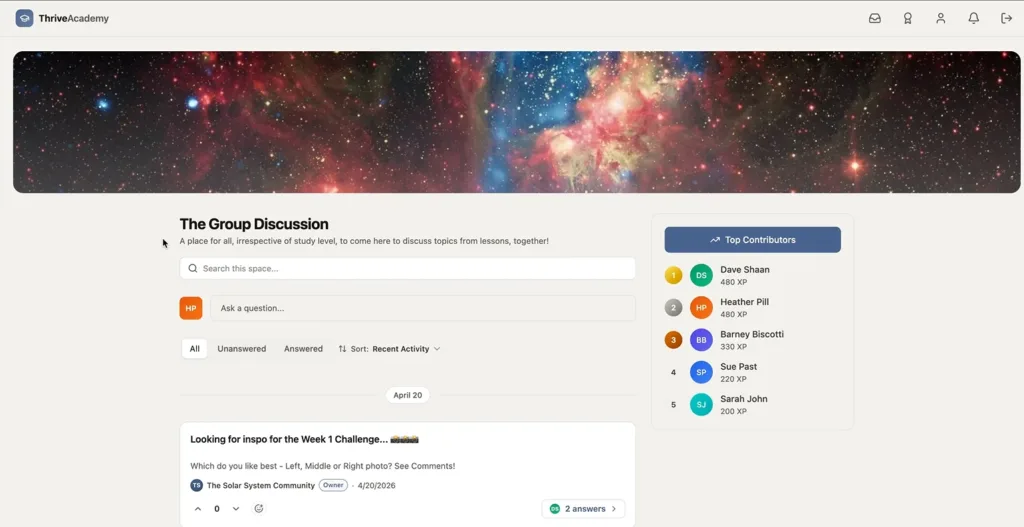
| ThriveCart tip: Inside ThriveAcademy, ThriveCart’s course hosting platform, you can drip modules on a schedule, attach quizzes, and gate later modules behind earlier completion. ThriveAcademy is a community-focused learning platform that makes it ideal for all three course formats, particularly cohort-based learning, as it offers a number of gamification options, such as message boards and badges, to keep engagement strong. |

Step 4) Create engaging content
This is the part every course creator jumps to first, which is why so many courses never ship. Content production becomes effortless when you know who you’re talking to, what you want them to do, and how to structure the message. Your job is to write, record, and edit – in that order – then upload your video and audio files into the platform.
Script before you record
A full script is your best defense against rambling, inconsistent pacing, and voiceover that doesn’t match your slides. If you’re new to course creation, write out every word you plan to say. It takes longer upfront, but it tightens your delivery and makes re-recording far less painful.
Structure your script around four blocks:
- Hook (15-30 seconds): name the problem this lesson solves and why it matters now.
- Teach (2-6 minutes): deliver the core concept in three to five standalone points that match your teaching style.
- Example (1-3 minutes): use storytelling to create a narrative that resonates, such as the Hero’s Journey.
- Action (30-60 seconds): close with the one thing the learner should do before the next lesson.
Frame your modules as steps on that journey, and you’ll see completion rates jump.
👀➡️ COMMUNITIES + LEARNING = SUCCESS. SEE HOW IT WORKS! | ‘Introducing ThriveAcademy: Transform Your Courses Into Thriving Social Learning Networks’
Step 5) Leverage the power of your platform
Your learning platform is the engine that hosts your course, processes the sale, and tracks the student experience. Pick the wrong one, and you will spend more time fighting tools than teaching. Pick the right one, and the platform sells alongside you, which matters when selling online courses at scale.
What to look for in a course platform
- A clean checkout with native order bumps, one-click upsells, and downsells.
- An LMS for hosting modules, lessons, and quizzes.
- Affiliate management, so other creators can promote your course for a commission.
- Predictable cost. One-time or fixed subscription-based pricing (monthly or annual) protects your margin.
Course creation platforms compared
| Platform | Starting price | LMS features | Upsell/order bump support |
| Kajabi | $179/month | Courses, communities, coaching | Limited native order bump functionality depending on setup |
| Podia | $39/month; 5% transaction fees (depending on plan) | Courses, downloads, memberships | Cross-sells and basic upsells |
| Teachable | $39/month; 7.5% transaction fee (lower-tier plans) | Curriculum, quizzes, certificates | Order bumps on higher tiers |
| Thinkific | $49/month | Courses, assignments, certificates | Limited native upsell logic |
| ThriveCart | ThriveAcademy $37-$97/month. Add ThriveCart Standard ($19/month) or ThriveCart Pro+ ($29/month) for advanced checkout and sales funnel features | Communities, modules, lessons, quizzes, gamification, points, course dripping, SCORM support, leaderboards, forums, and more | Native order bumps, one-click upsells, and downsells on the checkout cart page |
Kajabi isn’t your only option. If you’re considering it, our Kajabi alternatives breakdown explores the key trade-offs in detail.
For a deeper feature-by-feature breakdown, see the must-have features of online course platforms. Power users who need advanced rules, dedicated account management, unlimited video storage, and unlimited learners typically upgrade to ThriveAcademy’s Scale plan at $97/month (billed annually) or $167/month for new users who also want the Pro+ checkout (billed annually).
Ready to see which plan fits your needs? Explore ThriveCart’s features and plans so you can pick the one that matches the way you want to sell.

Step 6) Foster interactivity and community
One of the advantages of online learning is the potential to build a global community of learners. Don’t just teach people. Ask questions, spark discussions, and respond when students engage. A course with a real community gets completed, reviewed, and recommended.
Build interactivity into the lessons
- Workbook prompts at the end of every lesson, written into a downloadable PDF or Word doc.
- Mini-assignments after each module: a draft sales page, customer research summary, or workflow diagram.
- Checkpoint quizzes where learners must hit a certain pass mark (of your choosing) in order to move on to the next section.
- Live office hours, even on a self-paced course. A monthly 30-minute group call dramatically lifts completion.
Build a community where your students already are
- A private community channel inside the LMS or another space.
- A directory of past students.
- A graduate showcase or wall of wins.
- Leaderboards and experience points.
👀➡️ MORE FROM THE BLOG | ‘How to Sell Digital Products in 2026: A Step-by-Step Guide‘
Step 7) Implement effective assessments
Assessment is a crucial component of learning. Partly because you need a way to track whether your course material makes sense and is engaging learners, but also for them to see progress and feel a sense of achievement and validation. Develop assessments that align with your course objectives. A mix of quizzes, assignments, and practical projects helps you gauge understanding and reinforce key concepts so the lessons stick.
With ThriveAcademy, students are awarded points for completing modules, passing a quiz, and setting learning goals. Students can unlock badges, improve their leaderboard rankings, and get in-platform celebration modals when they hit certain milestones. In short, gamification is an excellent tool for increasing engagement and keeping your students happy.
Step 8) Optimize for accessibility and inclusivity
Accessibility shouldn’t be an afterthought. Designed in from day one, it widens your audience, lifts comprehension, and protects you from compliance risk.
Great ways to do this include closed captions, downloadable transcripts, and ensuring your platform is compatible with assistive technologies.
ThriveCart’s customization options let you build a user-friendly interface that enhances accessibility for all learners.
👀➡️ FOR YOU | ‘How to Successfully Deliver Courses, Memberships, and Downloads With ThriveCart Fulfillment‘
Step 9) Develop a strategic marketing plan
A great course with bad marketing is just a hobby, one that’s bound to cost you money, not generate revenue. A good course with a great marketing plan is a business. Plan your launch and your evergreen sales promotion before you finish recording, and put a dedicated course landing page at the center of every campaign.
Pre-launch: warm the audience
- Start a paid waitlist four to six weeks before you open the doors.
- Publish three to five cornerstone pieces (article, podcast, or video) that solve a problem your course solves.
- Run a free workshop that previews the first 20% of the course. Even free courses or short training sessions build trust faster than paid ads alone.
Launch: Open enrollment with intent
- Run a five to seven-day enrollment window with daily emails, and one live mid-window event (a Q&A or demo session works well here).
- Add order bumps on the checkout page (a workbook, a bonus module, a 1:1 session), and a one-click upsell to a higher tier or bundle after purchase.
- Reactivate people who started checkout but didn’t finish with a 24-hour urgency sequence and a final email 90 minutes before enrollment closes.
- Stack affiliate partners at 20 to 40% commission, which is the standard range for digital courses and gives partners a strong enough incentive to promote actively.
Evergreen: keep selling after the launch
- Turn launch emails into an automated five to seven-day welcome sequence for new subscribers.
- Use search-optimized cornerstone articles as the entry point to a free lead magnet that funnels into the course.
- Refresh the offer every six to 12 months with new bonuses, testimonials, or pricing windows.
Step 10) Gather and implement feedback
Continuous improvement is key to your course’s success. Encourage feedback through surveys, reviews, and direct communication. Use it to identify the gaps and update your course content.
A course is a living thing, especially if your area of expertise is constantly evolving. Keeping your course current proves that you care about your students’ online education.
👀➡️ READ ONE 7-FIGURE SELLER’S SUCCESS STORY | ‘The Freedom Formula: How Rob Cornish Turned Redundancy Into $41,000 a Month in Recurring Income‘
FAQs
Q: How much does it cost to create an online course?
A: That very much depends on the software you use. An online course typically costs between $0 and $500 to produce, plus your hosting platform fees. A monthly LMS plus a separate checkout can run $1,500 to $4,000 per year, while ThriveCart offers a more affordable solution, starting at $648 (ThriveAcademy Starter + Thrive Standard, billed annually) up to $1,524 (ThriveAcademy Scale + ThriveCart Pro+, billed annually) for creators and coaches with more advanced needs.
Q: What is the best way to learn how to create an online course?
A: The best way to learn how to create an online course is to follow a structured framework: validate your niche, define clear outcomes, choose the right platform, and pre-sell before you record.
Q: How long does it take to build an online course?
A: Most first-time creators ship a launch-ready online course in six to 10 weeks of focused part-time work. Pre-selling a paid waitlist before recording is the most reliable way to keep the timeline tight.
Q: Do I need tech skills to create an online course?
A: No. Modern course platforms are built for non-technical creators. ThriveCart makes it easy to launch and scale without touching code. You can bundle multiple courses into one offer, connect a custom domain, and automate student journeys with behavior-based tags.
Ready to create your online course?
Congratulations, you’re now ready to start creating online courses. By identifying your audience, setting clear objectives, creating engaging content, leveraging technology, fostering community, and implementing effective marketing strategies, you’re well on your way to crafting a successful online learning experience.
Remember, teaching online is dynamic and ever-evolving. Stay informed about industry trends, continuously refine your content, and adapt it to your audience’s needs. With dedication, creativity, and the right tools, such as ThriveCart, you can create an online course that not only imparts valuable knowledge but also leaves a lasting impact on your students’ lives. Happy teaching!