
You’ve made the PDF. Maybe it’s a workbook, a template pack, a financial planner, or a niche guide you’ve been putting off turning into a product. The hard part isn’t actually the PDF. It’s figuring out where to sell digital downloads, how to take payments, and how to set things up so your checkout does more than just process a card.
That’s what this guide covers. You’ll walk away knowing how to pick a topic worth paying for, how to price and package your PDF, and how to build a checkout that turns browsers into buyers.
Key insights:
- Selling PDFs is one of the lowest-cost, highest-margin ways to monetize what you know.
- You don’t need a website or a big audience to get your first sale.
- The platform you choose matters more than the PDF itself when it comes to how much you earn per customer.
- Smart checkout tools let you add order bumps and upsells that can significantly increase your average order value without extra marketing effort.

Why selling PDFs is a strong digital product model
PDFs are one of the simplest digital products to create and one of the most scalable to sell.
Here’s why the model works:
- No overhead. There’s no inventory, no shipping, and no storage. Once the file exists, your cost to deliver it is essentially zero.
- High margins. Digital products typically achieve 80-90% profit margins because there are no manufacturing or fulfillment costs eating into your revenue.
- Instant delivery. Buyers get the file immediately after purchase, which means no waiting and no support tickets asking “where’s my order?”
- Scales without your time. Whether you sell five copies or 500, you’re not doing extra work. Your checkout handles everything automatically.
The broader market backs this up. As of 2025, the digital products economy generates more than $2.5 trillion in annual value, and 67% of internet users are paying for some form of digital content every month.
With the creator economy alone worth $250 billion in 2023 (and projected to more than double by 2030), PDFs are a small slice of that market, but an incredibly accessible entry point.
So if you’re wondering whether PDFs are dead in 2026, the data shows there’s still huge global demand.
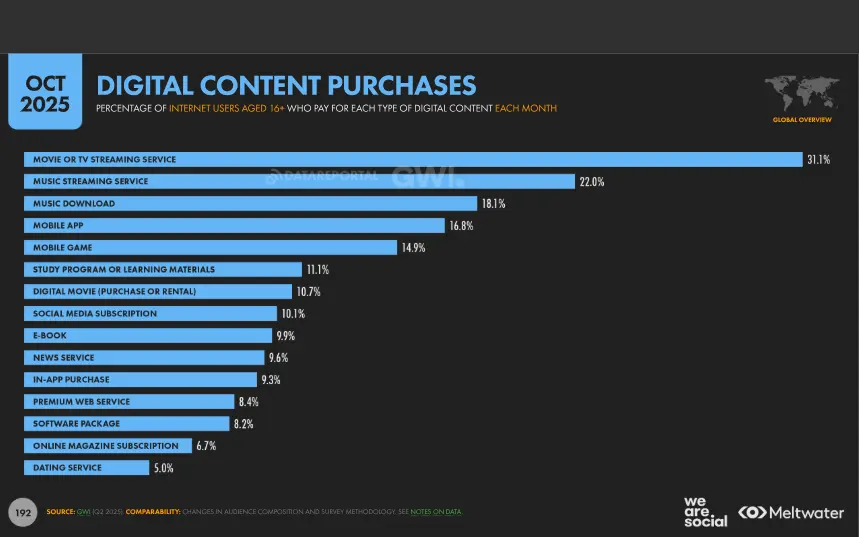
As you’ll see from the chart above, entertainment (movies, TV, music, and games) and apps make up the lion’s share of digital content purchases – which makes perfect sense. However, ebooks come in at 9th place (9.9% of monthly online content purchases), above software, in-app purchases, news, and dating services.
While you’re here, check out this short video guide that outlines exactly how to sell your first digital product online in just 72 hours

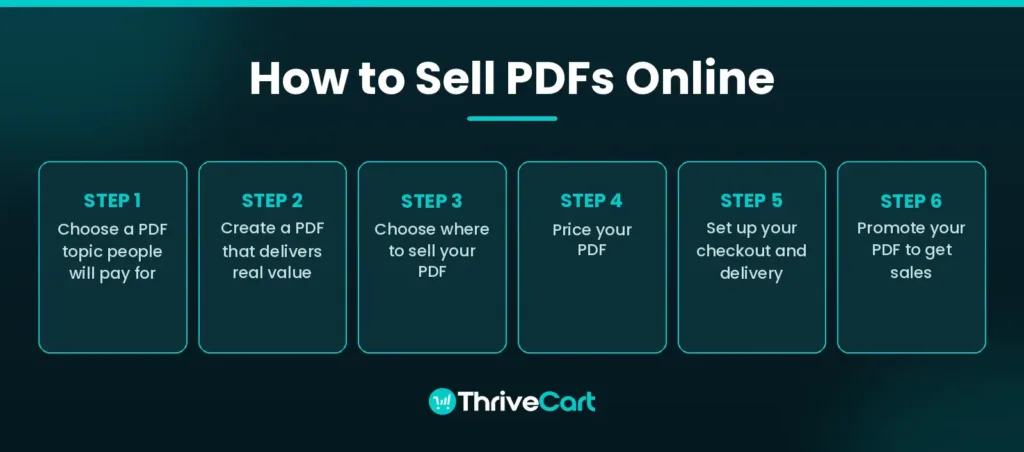
Step 1: Choose a PDF topic people will pay for
Don’t skip this step. The most common reason PDF sellers don’t get traction isn’t poor design or bad marketing. It’s that they made something nobody searched for.
How to validate demand before you create anything:
- Search your topic on online marketplaces like Google, Gumroad, and Etsy. If others are selling similar PDFs, that’s demand confirmed, not competition to fear.
- Browse Etsy’s digital downloads section and filter by bestsellers. Look for patterns in what’s selling.
- Check Reddit or Facebook groups in your niche. Recurring questions are product ideas in disguise.
- Use free keyword tools like Google’s autocomplete or Keyword Planner to see what people are actively searching for.
Categories with consistent demand:
- Business tools and templates (invoices, SOPs, contracts)
- Personal finance (budgets, savings trackers, debt payoff planners)
- Health and fitness (meal plans, workout logs, habit trackers)
- Productivity and organization (planners, daily schedulers, project trackers)
- Education and career (study guides, resume templates, interview prep)
Here’s one rule that’ll save you: specificity wins. “Daily planner for freelancers who miss deadlines” will outsell “daily planner” every time. The more precisely your PDF solves a named problem for a specific person, the easier it is to market and the more willing people are to pay for it.
Step 2: Create a PDF that delivers real value
You don’t need design skills to make a great PDF. You need clarity.
Tools that’ll get you there:
- Canva – The go-to for well-designed PDFs, workbooks, and planners. Design templates are everywhere and it’s free to start.
- PiktoAI– Create any kind of visual (infographics, ebooks, reports, images etc) without the need for design skills. Like Canva, it’s free to start.
- Google Docs – Ideal for written guides, checklists, and text-heavy content. Export as PDF when done.
- Notion – Great for structured, template-style resources. Export to PDF or share as a Notion page.
- Adobe Acrobat – Useful for final-stage editing, adding form fields, and password-protecting the file.
What makes a PDF worth paying for:
- It solves one specific problem completely
- It’s easy to use without instruction (if someone needs a tutorial to use your planner, the planner needs work)
- The design is clean and readable, not cluttered
- It doesn’t waste space. Conciseness and usability matter more than page count.
A seven-page checklist that actually changes how someone works is more valuable than a 50-page PDF that pads out the content. Think tools, not textbooks.
→ SEE HOW IT’S DONE | ‘The Freedom Formula: How Rob Cornish Turned Redundancy Into $41,000 a Month in Recurring Income‘
Step 3: Choose where to sell your PDF
This is where most creators leave money on the table. Where you sell determines how much you earn per customer, how much control you have over your brand, and whether you’re building an audience or feeding someone else’s platform.
The three main models:
1) Marketplaces (Etsy, Gumroad, etc.)
Marketplaces give you instant access to an existing audience. You can make your first sale without a website or a following. The tradeoff is real, though:
- Platform fees eat into your margins – Gumroad, for example, charges a 10% fee while Etsy charges listing and transaction fees, which can add up quickly
- You have limited control over branding and the customer experience
- You can’t add order bumps, upsells, or run an affiliate program natively
- You’re building traffic for the platform, not for yourself
Etsy works well for certain PDF types (planners, printables, and templates), but with high transaction fees and algorithm volatility, it’s a tough long-term strategy if you want to grow a sustainable business around your digital products.
2) Revenue growth platform (ThriveCart)
An all-in-one checkout and sales platform like ThriveCart gives you the checkout experience of a serious business without needing to build one. You host your PDF file (on Google Drive, Amazon S3, Dropbox, or a delivery tool), then connect it to your ThriveCart product. ThriveCart handles the payment, sends the buyer their file, fires the confirmation email, and does it all automatically.
What sets this model apart:
- You own the customer relationship entirely
- You can add upsells and order bumps directly at checkout
- There’s a built-in affiliate center (on Pro+ plans) so your buyers can become your promoters
- You can integrate with your email list from day one
- You’re building your own asset, not renting space on someone else’s platform
ThriveCart users see average order values lift by up to 118% using checkout and funnel optimization features like order bumps, upsells, and downsells. That’s not a minor difference. That’s the difference between a $17 sale and a $36 sale on the same product.
3) All-in-one platforms
Tools like Payhip or SendOwl bundle hosting, checkout, and delivery in one place. They’re easier to set up for beginners but typically offer less checkout customization and fewer revenue optimization features than a dedicated checkout tool.
The bottom line: if you’re selling your first PDF and want to test the waters, a marketplace is fine. If you want to build a business around digital products, you want a checkout layer you control.
Step 4: Price your PDF
Pricing digital products is less about what feels fair and more about what the market expects to pay for a solution to a specific problem.
Rough benchmarks by category:
- Business tools and templates: $7-$49
- Productivity and planning tools: $7-$27
- Finance and budgeting resources: $17-$49
- Health, fitness, and nutrition: $19-$79
- Education and career guides: $17-$67
For comprehensive guides with interactive elements (workbooks, fillable PDFs, template packs), $37-$67 is a strong pricing zone.
A few pricing principles worth knowing:
- One-time pricing works well for standalone PDFs. It’s simple for buyers and removes purchase hesitation.
- Subscriptions require a content cadence. They make sense when you’re delivering new PDFs regularly, like a monthly template subscription or a content library.
- Bundles increase average order value. Pair your core PDF with a bonus checklist, a related template, or a short video walkthrough. Buyers perceive more value even at a higher price.
- Order bumps are your secret weapon. Adding a $9-$19 add-on at checkout (a related checklist, a second template, or an extended version) adds revenue without any extra marketing. ThriveCart’s order bump feature is built for exactly this, and it works because the buyer is already in purchase mode.
Don’t underprice. Creators who price at $5 signal low value, attract bargain hunters, and burn out fast. If your PDF genuinely solves a problem, charge accordingly.
→ RELATED READING | ‘How to Price Your Online Course (And Stop Leaving Money on the Table)‘
Step 5: Set up your checkout and delivery
Here’s the practical setup you need before you can start getting paid:
What a working checkout setup includes:
- Payment processing (credit card, PayPal, Stripe, Apple Pay, etc)
- Instant file delivery after purchase
- A confirmation email with the download link
- Tax and VAT handling (especially relevant if you’re selling internationally)
How to connect ThriveCart to deliver your PDF:
- Host your PDF somewhere reliable. Google Drive, Dropbox, Amazon S3, or a digital delivery tool all work well. ThriveCart doesn’t host your files; it handles the checkout. You link your hosted file to your ThriveCart product and it delivers it automatically post-purchase.
- Create your product inside ThriveCart, set your price, and configure your checkout page.
- Add an order bump. You’d be surprised how many buyers add a $9 or $17 add-on when it’s relevant and well-positioned. Set it up from day one, not as an afterthought.
- Connect your email platform (Mailchimp, ActiveCampaign, ConvertKit, etc.) so every buyer is automatically added to your list.
- Turn on ThriveCart’s affiliate center if you want buyers and partners to promote for you. It’s built in via the Pro+ plan, not a third-party plugin.
A note on international sales and VAT:
If you’re selling to buyers in the EU, UK, or Australia, you’re likely required to collect and remit VAT. ThriveCart handles this automatically (on its Pro+ plan), which removes a huge administrative headache for sellers who don’t want to manage taxes manually.
Step 6: Promote your PDF to get sales
The best products in the world don’t sell themselves. Here’s where most of your early sales will actually come from:
Your email list is your most valuable channel
- Start building it before you launch. Offer a free excerpt of your PDF, a related checklist, or a sample template as a lead magnet.
- Email your list first when you launch. Even 100 engaged subscribers can generate enough initial sales to validate the product.
- A simple launch sequence of 3-4 emails (teaser, launch, value, last chance) works better than a single “buy this now” message.
Social media and communities
- Don’t just post the product. Share the problem it solves. “Here’s how I stopped missing client deadlines” will outperform “buy my planner” every time.
- Niche Facebook groups, Reddit communities, and LinkedIn posts that lead with value drive better qualified traffic than ads, especially early on.
- Short-form video (Instagram Reels, TikTok) is one of the highest-leverage channels for PDF sellers right now. A 30-second “what’s inside my PDF” walkthrough converts well.
Affiliate marketing
- If you’ve set up ThriveCart’s built-in affiliate center, you can invite buyers, peers, or content creators to promote your PDF in exchange for a commission. This gives you a sales team you only pay when they perform.
- It’s one of the most underused growth levers for PDF sellers, and it doesn’t require any additional tools or integrations.
SEO for your product page
- Use your primary keyword (for example, “vibe coding prompts”) in your product page title and description.
- A blog post targeting a related question can send long-term organic traffic to your product page without paid ads.
→ RELATED READING TO DOWNLOAD TODAY | ‘The Skills Crisis Gold Rush: How to Turn Your Expertise Into a 6-Figure Education Empire‘
FAQs
Q: Can I sell PDFs with ThriveCart?
A: Yes. You can sell digital downloads through ThriveCart, including PDFs. You host the file externally (Google Drive, Dropbox, or Amazon S3), then link it to your ThriveCart product. ThriveCart handles the checkout, payment, and automatic file delivery (known as fulfillment). With Pro+, you can add multiple order bumps, an affiliate center, JV contract support, and tax handling on top.
Q: Do I need a website to sell PDFs online?
A: No. ThriveCart gives you a standalone checkout page you can link to directly. You can share that link on social media, in your email list, or in an online community without needing a full website. A website helps in the long term for SEO and brand building, but it’s not a prerequisite to making your first sale.
Q: How do I protect my PDF from being shared for free?
A: You can’t prevent sharing entirely, but you can make it harder. Common approaches include adding a visible watermark with the buyer’s name or email, using PDF password protection, and setting download limits and link expiration in your delivery tool. Keeping your product updated with new content also reduces the appeal of old shared versions. For most PDF sellers at an early stage, the risk of piracy is smaller than the risk of under-promotion.
Q: What is a good price for a PDF?
A: It depends heavily on the category and the depth of the content. A simple template or checklist can sell at $7-$15. A comprehensive guide, workbook, or toolkit is typically priced at $27-$67. Business-focused PDFs with high-value, actionable content often command $49-$97+. Start by looking at what comparable products sell for, then price for the problem you’re solving rather than the page count.
Wrapping up
Selling PDFs online is genuinely one of the most accessible ways to build income around what you know. The barrier to entry is low, the margins are high, and you can start without a website, a big following, or any prior experience selling online.
But the creators who build consistent income from PDFs aren’t necessarily the ones with the best PDFs. They’re the ones who’ve set up their checkout to do the heavy lifting. An order bump here, an upsell there, an affiliate partner sending traffic they didn’t have to find themselves. That’s what separates a $200 launch from a $2,000 one.
ThriveCart is built for exactly that. It’s the checkout layer that turns a simple PDF into a revenue-optimized product, with the tools to grow it without starting from scratch every time.
Ready to set up your PDF checkout? Try ThriveCart and start selling your first digital product today.


