
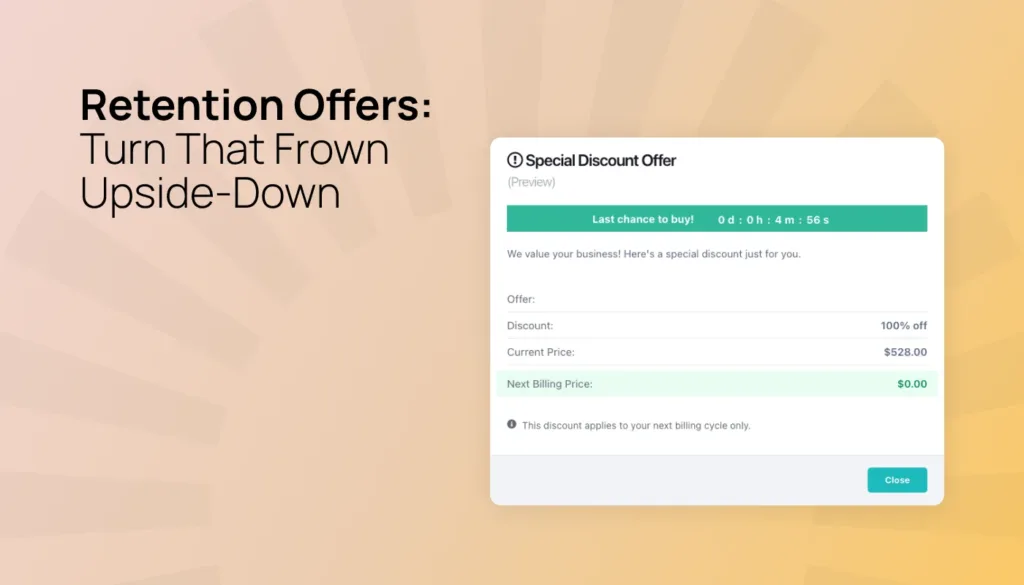

You’ve spent months building your course, program, or membership. You’ve crafted the content, nurtured your community, and earned recurring revenue you can count on. Then a subscriber clicks “cancel” – and just like that, that revenue is gone.
We’ve all been there. But the frustrating reality is that many people who cancel aren’t done with you forever. Maybe they just want a break. Or they’re feeling the pinch of a monthly bill. They’d stay if someone offered them a lower-cost option, discount, or even a short pause on their subscription. The problem is that no one was there to make that offer – until now!
ThriveCart’s new Retention Offers feature puts a smart, personalized offer between your customer and that final cancel button. It’s fully automated, requires zero manual outreach, and has three flexible options to win back your customer before they churn.
Here’s how it works.
Why subscription churn is different from other kinds of lost sales
When a one-time buyer doesn’t return, you lose a transaction. When a subscriber cancels, you lose predictable, compounding revenue, possibly permanently.
What makes it especially painful is that subscription churn is often passive. People don’t cancel because they don’t enjoy your course or coaching program. They cancel because:
- They’re going through a tight period financially
- They feel overwhelmed and just need a break
- They haven’t seen the value yet and need a little nudge
The standard cancellation flow gives them no alternative. They click cancel, they’re out, and you’re left trying to win them back with re-engagement emails weeks later – after their access is gone, the habit is broken, and the connection is lost.
Retention offers change that equation entirely.
What do retention offers actually do?
When a customer clicks “cancel” inside the customer hub, a branded modal appears before the cancellation is processed. It presents one clearly configured offer – of your choosing – alongside the option to continue canceling.
There’s no friction, no new checkout, and no new card required. If the customer accepts, ThriveCart handles everything instantly.
You configure one of three offer types per product:
Offer type | How it works | Who it’s perfect for |
⬇️ Plan downgrade | Switch the customer to a lower-priced plan with a single click. The plan swap happens seamlessly with the card/payment details already on file. | Customers who love your content but can’t justify the full price right now. |
⏸️ Subscription pause | Push the next billing date back by one, two, or three months. The customer keeps their access during the pause, and billing resumes automatically when the pause period ends. | Someone who’s heading into a busy season or just wants a break (but not a breakup!) |
🏷️ Discount coupon | Apply a recurring or one-time discount to the customer’s existing plan. They stay on the same product at a reduced rate for their next billing cycle. | When price sensitivity is the only thing standing between you and a retained subscriber. |
The cancel button is always visible alongside the offer, keeping the experience honest, straightforward, and fully compliant with click-to-cancel regulations.
Full tracking in your dashboard
You’ll see a new revenue breakdown section in your ThriveCart dashboard specifically tracking retention offer performance. Key metrics include:
- MRR won back (gross) – monthly recurring revenue saved through accepted offers
- ARR won back (gross) – annualized view of recovered revenue
- Win-back rate – accepted offers divided by total cancel button clicks, shown as a percentage
- Recovery fee applied – total fees charged so you always know your net position
You’ll also see a breakdown of offers presented versus accepted, split by offer type, so you can optimize over time. If you’re getting a high win-back rate on pause offers but a lower rate on discounts, you can adjust accordingly.
How to set up retention offers
Configuration lives inside your product settings and takes just a few minutes:
- Go to Product Pricing for the subscription product you want to protect
- Scroll to the Retention Offers section
- Choose your offer type: downgrade, pause, or discount coupon
- Write your custom “Save” copy that will appear in the retention modal – this is your chance to speak directly to the customer at the moment they’re about to leave
- Optionally, exclude customers who are still in their first month or on a free trial
- Save your settings
A few things to keep in mind:
- You can only configure one active offer type per product – choose the one most likely to resonate with your subscribers
- Downgrade offers require a live, active downsell product to be in place
- This doesn’t have to be a downgrade at all; this could actually be an upgrade, for example, to a discounted annual plan vs. a monthly plan, where you can prorate their existing payment to their new plan)
- Discount offers require an active coupon configured for the product
- If your downgraded product is unpublished or a coupon expires, the offer automatically disables itself – no manual cleanup needed
- The feature is available for ongoing subscription products only and requires a Pro+ account with Stripe Connect+ enabled on the product
Is this available on all plans?
Yes! Every plan has this available, on Stripe Connect+ and PayPal Enhanced.
ThriveCart charges a small fee when a subscription is successfully saved through the retention flow. If a customer declines the offer and cancels anyway, you pay nothing.
Here’s how the fee works:
Legacy Lifetime (Standard & Pro) | Pro+ Lifetime (Grandfathered) | Standard Subscription | Pro+ |
8% of first successful retained payment only | 8% of first successful retained payment only | 5% of first successful retained payment only | 0% |
→ Refer to the fees page for full details.
|
A second chance to keep the subscribers you’ve already earned
Every subscriber you retain is one you don’t have to replace. Acquisition is expensive, but retention is where the real leverage lives – especially for course creators, coaches, and entrepreneurs whose business model depends on recurring revenue.
Retention Offers are built to work quietly in the background, intercepting the moments that matter most without any ongoing effort from you. You set it up once. ThriveCart shows up for you every time someone tries to cancel.
And since you only pay when it works, it’s a no-risk way to boost your earnings and customer LTV.
FAQs
Q: What are Retention Offers?
A: Retention Offers give your subscribers an alternative when they click “cancel.” Before the cancellation is processed, ThriveCart displays a branded offer that you configure for the product, giving the customer another way to continue their subscription. You can offer a lower-priced plan, pause billing for one to three months, or apply a one-time or recurring discount. Customers can still choose to continue canceling at any time.
Q: What types of retention offers can I create?
A: You can configure one offer type per subscription product:
- Plan downgrade: Move the customer to a lower-priced plan using the payment details already on file.
- Subscription pause: Push the customer’s next billing date back by one, two, or three months. Billing resumes automatically afterward.
- Discount coupon: Apply a one-time or recurring discount to the customer’s existing plan.
You can also use an existing product to create an upgrade-style offer, such as moving a customer from a monthly plan to a discounted annual plan.
Q: How do I set up a Retention Offer?
A: Go to Product Pricing for the subscription product you want to protect, then scroll to the Retention Offers section. Choose your offer type, add custom “Save” copy for the cancellation modal, and save your settings. You can also choose to exclude customers who are still in their first month or on a free trial. Downgrade offers require a live, active product, while discount offers require an active coupon configured for the product.
Q: Is Retention Offers available on my plan and payment processor?
A: Retention Offers are available to ThriveCart merchants using Stripe Connect+ or PayPal Enhanced for ongoing subscription products. The feature is available across ThriveCart plans, although fees vary by account type. Standard subscription accounts are charged 5% of the first successful retained payment, while Pro+ subscription accounts pay no Retention Offers fee. Legacy lifetime accounts may be charged 8% of the first successful retained payment. See the ThriveCart fees page for full details.
Q: How much does Retention Offers cost?
A: You only pay when a customer accepts an offer and successfully makes a retained subscription payment. If the customer declines the offer and cancels, you pay nothing. For current subscription plans, Standard accounts are charged 5% of the first successful retained payment, while Pro+ accounts pay no fee. Legacy lifetime accounts are charged 8% of the first successful retained payment. Retention Offers use the customer’s existing payment details, so customers do not need to complete a new checkout or enter their card information again.
When can I start using Retention Offers?
Retention Offers are part of our bumper Fall 2026 update and is now available for ThriveCart Pro+ users with Stripe Connect+ enabled on their subscription products. Log in to your account and visit Product Pricing to get started.
Not yet using ThriveCart? Start a free 30-day trial and explore revenue-focused features, including order bumps, upsells, downsells, and high-converting checkouts.

